



kellandrew_9101
Participant
June 18, 2026
Question

Merge profiles having the same work e-mail

  • June 18, 2026
  • 2 replies
  • 0 views

This looks like a bug and I’m not sure how to resolve it.

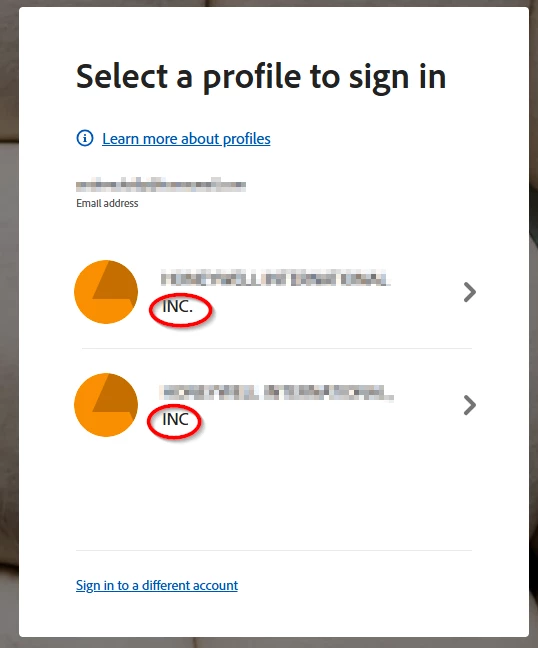
I have a subscription through my company.  When I log in, I say it’s a work/school account.  Then I enter my e-mail address.  The next screen, it asks me which profile to sign in.

I don’t think I should have more than work profile in my work account.  I don’t know how this happened.  Maybe a bug between my company and Adobe.

Here’s the problem.  It’s the same account (work e-mail address).  Only one of them has an active subscription.  the other one looks like spelling and punctuation differences.  If I choose the “wrong” profile, then it says I can start a free trial or buy the product.  It makes no sense that I have to log in to the same account but choose THE OTHER PROFILE.

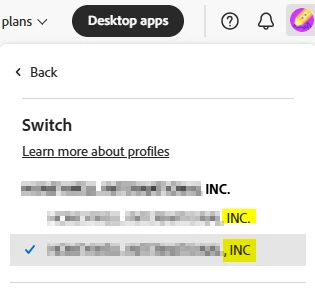
Also confusing.  if  I click on my picture, it allows me to switch profiles.  My issue is I shouldn’t have two profiles.  I think they should be merged (same company / same e-mail) or the inactive one deleted.   But I can’t get support on this issue

No, this isn’t a “personal” account with my work e-mail.  No, I don’t have both a work and a personal account having the same e-mail.  This is one work account having two different account profiles assigned.  Which seems like a bug (because if I log in to the wrong profile, the license is assigned to the other profile).
 

    2 replies

    Community Manager
    June 18, 2026

    Hi ​@kellandrew_9101,


    Thank you for reaching out, and we understand how confusing this must be, especially when both options at the chooser screen look like they belong to the same work email. We appreciate you taking the time to lay out the details and screenshots.


    To restate what's happening: when you sign in with your work email, you're presented with a profile chooser showing two options. Only one carries the active subscription from your company, and selecting the other one offers you a trial or purchase. You'd like to understand why both exist and whether they can be merged or the inactive one removed.


    The behavior you're seeing is by design, not a bug. When the same email address is associated with more than one Adobe plan, or with both a personal Adobe account and a business plan provided by an organization, Adobe creates separate profiles for each, each with its own dedicated storage. They share the email at the sign-in screen, but they are distinct accounts and no data is shared between them automatically. This is covered in detail here: https://helpx.adobe.com/enterprise/kb/enterprise-id-faq.html


    Because of that, the two profiles cannot be merged by the user. To help us point you to the right next step, could you confirm the following:

    1. Is your company's subscription a Creative Cloud for Teams or a Creative Cloud for Enterprise plan? This determines who has admin access to your account and what options are available from your organization's side.
    2. On the chooser screen, is the inactive option labeled as a Personal Profile (typically shown with a blue avatar) or as another Business Profile (typically shown with an orange avatar and an organization name)?
      • If it's a Personal Profile, it likely corresponds to an Adobe ID previously created at adobe.com using the same email, separate from your company's plan. That one stays with you as an individual and can't be deleted by your company's admin.
      • If it's a second Business Profile, it would mean your email is provisioned in more than one Admin Console (for example, an old organization that hasn't removed your account). In that case, the right next step is for the admin of that other organization to remove your account from their console.


    In the meantime, you can also set your active work profile as the default at sign-in so you're not prompted to choose every time. Sign in at https://account.adobe.com, go to Account and security > Sign-in and security, and enable Select my profile automatically.

    Once set, sign out and sign back in choosing the correct (active) profile, and that will become your default going forward.


    Please share those details when you get a chance, we're happy to take it from there.

    Thanks,

    ^BS

    kellandrew_9101
    Participant
    June 18, 2026

    Edit: this seems related. but it doesn’t mention how to remove a bad or inactive profile
    https://helpx.adobe.com/enterprise/kb/introducing-adobe-profiles.html