
Participating Frequently
December 13, 2022
Answered

Mise à jour de Creative bloquée + blocage des mises à jour d'applications

  • December 13, 2022
  • 2 replies
  • 3024 views

Bonjour à toutes et tous et merci d'avance pour l'aide que vous pourrez m'apporter.

Depuis quelques jours sur Mac0S 12.4 Monterey, le téléchargement n'a pas l'air d'être effectué pour une MAJ de Creative Cloud, ce qui semble bloquer la MAJ d'applications comme Lightroom ou Photoshop. CC ne semble même pas arriver à afficher les informations de stockage du cloud.

J'ai testé en redémarrant mon ordinateur, en relançant CC, tenté de réparer ou désinstaller CC (mais j'ai un message d'erreur) mais aucune solution ne fonctionne.
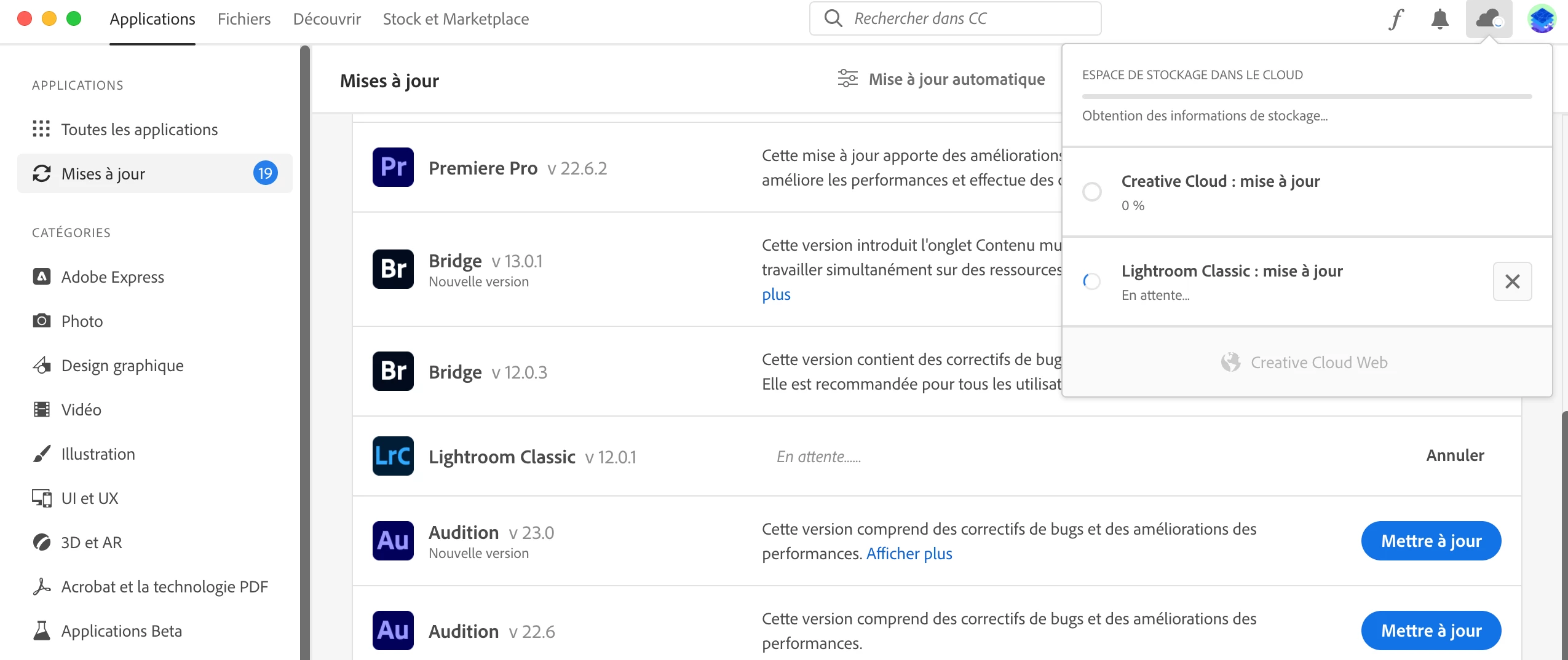
 

Merci par avance si vous pouvez m'aider.


This topic has been closed for replies.
Correct answer Jeffrey_A_Wright

Hello Jeff and thank you,
I used my personnal email adress to create the account in the community but my account (Adobe for companies) is linked to my professional email adress. I'm sending it to you on the spot.


Thanks, Pitchodobrasil, but I don't see an active membership under that e-mail address either. I do see that an organization has claimed the e-mail address you sent.


The suggestions offered by Kglad will only be effective for individuals who have unrestricted access to the computer and network they are utilizing. I would encourage you to contact whoever in your organization manages the computers and networks for assistance.


I will also move this discussion to the Enterprise & Teams forum, which can better provide suggestions for people using a computer or membership managed by a company, organization, church, or school.

2 replies

Participant
February 24, 2024

Bonjour j'ai me meme probleme avez vous trouvé une solution ??`

Merci baucoup 

kglad
Community Expert
Community Expert
December 13, 2022

reset the cc desktop app:

make sure it's in the foreground, then press:
Win: Ctrl + Alt + R
Mac: Cmd + Opt + R


if that fails, repair per
https://helpx.adobe.com/download-install/kb/creative-cloud-install-stuck.html


if that fails, uninstall using the correct uninstaller from
https://helpx.adobe.com/creative-cloud/help/uninstall-creative-cloud-desktop-app.html#sa_src=web-messaging
and then reinstall*


if that fails, do a clean cc install carefully following each applicable step:

uninstall every cc app including preferences per https://helpx.adobe.com/creative-cloud/help/uninstall-remove-app.html

then uninstall the cc desktop app, again using the correct uninstaller per https://helpx.adobe.com/creative-cloud/help/uninstall-creative-cloud-desktop-app.html#sa_src=web-messaging

clean your computer of cc files per http://www.adobe.com/support/contact/cscleanertool.html

check for, and if available, update your os

repair all ms visual c++ versions that can be repaired

update your ms visual c++, if it can be updated

restart your computer (don't skip this)

reinstall the cc desktop app*


*use the "alternative download links" at the bottom of the page at https://helpx.adobe.com/download-install/kb/creative-cloud-desktop-app-download.html

use the desktop app to install your cc programs/trials

Participating Frequently
December 13, 2022

Thank you very much @kglad 


Are you sure about the command for reseting the cc desktop app on a Mac ? Doesn't look like it's working.

I then followed your advice and tried to repair it -> didn't work
So I uninstalled / reinstalled it and restarted my computer (which I updated too) -> didn't work. 
The CC desktop app tells me it needs an update but wouldn't launch it 🤬 
So I tried to check the solution of this page : https://helpx.adobe.com/fr/download-install/kb/background-processes-macos.html#enable-login-items -> didn't work 
I don't want to take the risk of uninstalling the adobe apps I'm using everyday and are running well.


Participating Frequently
December 13, 2022

When I try to repair the CC desktop app using the uninstaller :