Participating Frequently
October 28, 2016
Answered

missing app-section in CC, not able to update

  • October 28, 2016
  • 10 replies
  • 1631 views

I got the CC installation files with etla licence from my university (Bayreuth, Germany) but unfortunally there's zero support for the Adobe products the are selling 😞

With Win10 everthing seems to be fine, second installation on a mac the german language version is missing and I'm not able to update the apps. I've Home, Elemente, Stock and Community in the Creative Cloud (3.7.0.272) but no "App".

Any suggestions other than switching to a another university? 😉

    This topic is closed to new replies. Start a new post to keep the conversation going.
    Correct answer alisterblack

    Thank you kglad but that doesn't regards to my case because of the ETLA-licence I think. I don't habe a Membership with the Apps. No Problem with the Win10 Computer and the same Adobe-ID as with the Mac where the Problems occur.


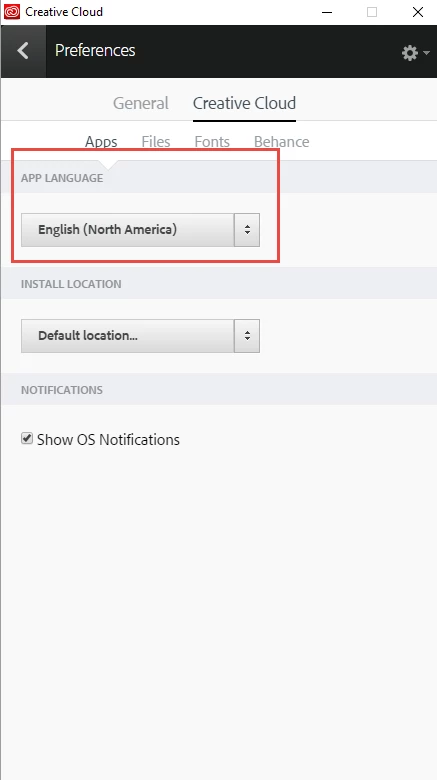
    In the Creative Cloud Desktop App to the cog icon in the top corner and choose Preferences.

    In the Creative Cloud section try switching the language, for example to English (North America) or German.

    Also, if your organisation has an ETLA they can open a ticket with support via the Support tab of the Enterprise Dashboard.

    10 replies

    kglad
    Community Expert
    Community Expert
    October 28, 2016
    Participating Frequently
    October 28, 2016

    Thank you  have the Apps tab but now cc desktop App shows that I have no apps installed. The screenshot shows, this isn't true :-(

    Bani Verma
    Legend
    October 28, 2016

    Hi Ulrichf32819305,

    As you have mentioned that the apps are successfully installed, however they don't show up as installed in the Adobe Creative Cloud desktop app, i would recommend you to refer to the following help document: Apps panel doesn't show installed Adobe Creative Cloud apps.

    Let us know if this helps.