January 6, 2026
Question

Modifying Preset Adobe PDF Settings - dialog box not showing fully

  • January 6, 2026
  • 11 replies
  • 295 views

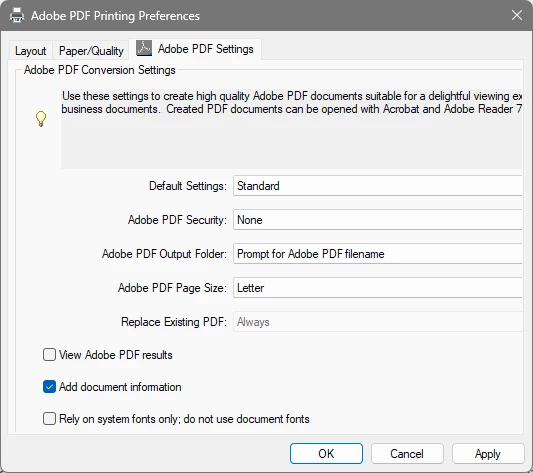
Running Acrobat Pro on Windows 11.  I am trying to modify the Adobe PDF Conversion Settings in the Adobe PDF Printing Preferences dialog box.  The selection boxes to the right of the four options for Default Settings, Adobe PDF Security, Adobe PDF Output Folder, and Adobe PDF Page Size all are missing on the right side of the box.  See below screnshots for what i would expect to see and then what I am seeing.
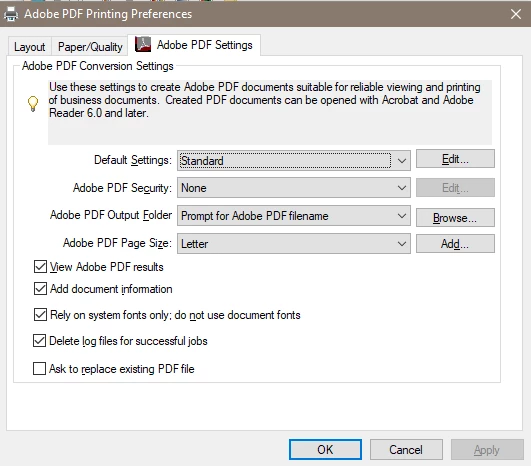
 

873040iE5D8038A96FFEC92.png873041i1099D2F88ED50445.png

11 replies

August 12, 2026

@Tariq Dar  Did you receive any resolution to this issue? It seems this is plaguing us. In the meantime, I’m having one of our guys open a case with support. 

Amal Jaiswal
Community Manager
Community Manager
August 12, 2026

​Hi @jonathonm97379428 ,

Thanks for reaching out, and sorry this is causing trouble for you too.

A few things worth checking,

  1. What Acrobat version are you on, and is it fully updated? (Help > Check for Updates)

  2. Windows display scaling: this kind of "missing part of a dialog box" issue is often tied to high-DPI scaling. Go to Windows Settings > System > Display > Scale, and try switching it to 100% temporarily to see if the missing boxes show up.

  3. Try a repair install (Win Only): in Acrobat, go to Help > Repair Installation. This fixes corrupted app resources sometimes causing rendering glitches like this.

Let me know if any of those change what you're seeing.


~Amal

August 12, 2026

@Amal Jaiswal  - 

This is affecting the 26.001.x releases in our environment.

We have the following deployed: 

26.001.21691
26.001.21771
26.001.21789

Display scaling is not the problem, nor are any other system display related settings. 

I was hoping that anyone replying would have assumed we attempted a repair already. In addition, a full uninstall, running the acrocleaner tool provided by support, etc. 

We have also noted internally that the versions affected are inconsistent and reinstalling the PDF printer driver does not correct the issue. Windows builds vary between 24H2 and 25H2 fully patched.

We still have some other troubleshooting to do on our end, but that’s why I was reaching out to see if a solution had already been provided in hopes to save my team some time. 

Legend
January 6, 2026

Hi @46538432, 


Thanks for reaching out and sharing your findings and feedback. 
Could you let us know what version of Acrobat is installed? To check Acrobat version installed:  https://adobe.ly/3PQQ7nE


Additionally, if you have a multi-monitor setup, could you please disconnect the secondary monitor and try again? Let us know how it works.


Please ensure your copy of Acrobat is updated. To check for any pending updates, launch Acrobat, then select Help > Check For Updates.

Information on latest update available can be found here: https://adobe.ly/3YmWW4K

Best regards,
Tariq | Adobe Community Team

January 6, 2026

I am running Adobe Acrobat verson 25.001.20997.  It is fully updated.  I am not running a multi monitor setup.

Legend
January 7, 2026

Thank you for the quick response. 
Is it possible you could share a short video of the issue, while I discuss this internally with the product team. 


Best regards,
Tariq | Adobe Community Team