
Participant
June 28, 2025
Answered

Need help removing third party organization rights, want to consolidate all profiles into one

  • June 28, 2025
  • 1 reply
  • 128 views

So yeah i dont know how to even type this in a coherent manner,


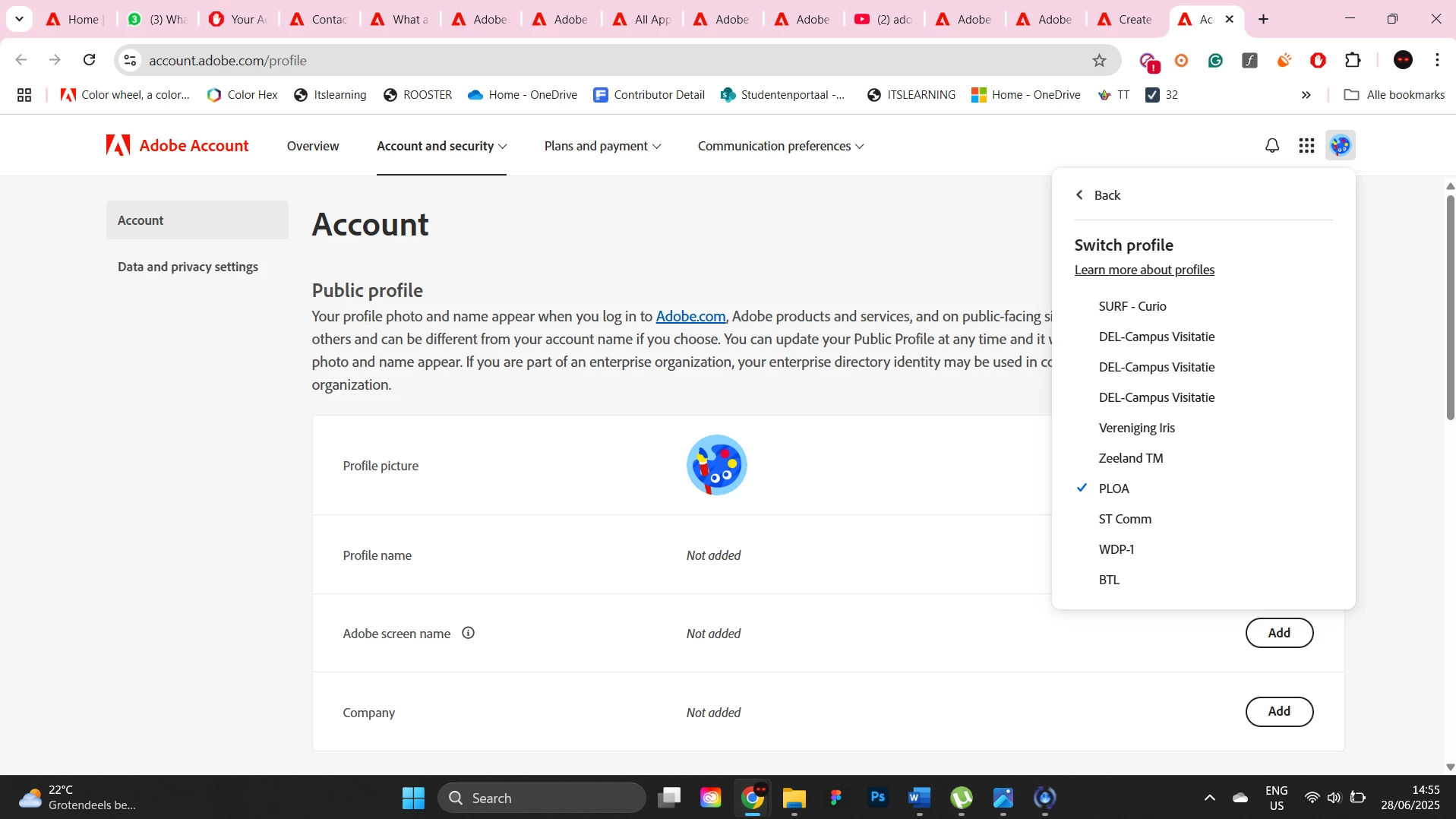
I bought a year adobe membership from this third party website, all of a sudden all these profiles started popping up, with only one having the actual license on the profile, the others just exist for some reason. I dont know how to delete them, and on some actually have portfolio work. 


I want to consolidate all profiles into my main original one ( that didnt even get the license on it btw, another profile had it activated) so all my work is again in one singular profile. And i want to take these admin / org rights away from them or whatever and give all power back to myself because this is becoming extremely annoying. When selecting different profiles,

the organization also changes to that org, I have no idea  going on and it pisses me off. SEE SCREENSHOTS


[Edited by moderator: Please refrain from sharing your personal details as this is a public forum accessible to all.]


Correct answer Anshul_Nautiyal

Hi @IanIrwin,

Thank you for reaching out.

Based on your query, it appears that you are seeing multiple profiles to choose from when signing in to Creative Cloud or other Adobe applications. This typically happens when your Adobe ID has been associated with multiple contracts, and you have been assigned licenses under each.

As you mentioned that the subscription was purchased through a third-party organization or reseller, we recommend reaching out to them directly. They will be able to remove your Adobe ID from any unnecessary contracts and ensure that your license entitlement is correctly assigned under a single contract.

Additionally, since you mentioned having portfolio work saved under different profiles, you can use the following guide to transfer and consolidate your assets into a single profile:
https://adobe.ly/3I4SVgm

We hope this helps. Please let us know if you need any further assistance.

Regards,

^AN

1 reply

kglad
Community Expert
Community Expert
June 28, 2025

are you paying for subscriptions on those other accounts?


if not, check to make sure there are no subscriptions on those other accounts.  then go to https://www.adobe.com/privacy.html, click contact us and request those profiles be deleted.

Anshul_NautiyalCommunity ManagerCorrect answer
Community Manager
June 30, 2025

Hi @IanIrwin,

Thank you for reaching out.

Based on your query, it appears that you are seeing multiple profiles to choose from when signing in to Creative Cloud or other Adobe applications. This typically happens when your Adobe ID has been associated with multiple contracts, and you have been assigned licenses under each.

As you mentioned that the subscription was purchased through a third-party organization or reseller, we recommend reaching out to them directly. They will be able to remove your Adobe ID from any unnecessary contracts and ensure that your license entitlement is correctly assigned under a single contract.

Additionally, since you mentioned having portfolio work saved under different profiles, you can use the following guide to transfer and consolidate your assets into a single profile:
https://adobe.ly/3I4SVgm

We hope this helps. Please let us know if you need any further assistance.

Regards,

^AN