Participant
May 18, 2018
Answered

New Educational "k-12 named user licensing" questions

  • May 18, 2018
  • 1 reply
  • 1346 views

Can't seem to find any Adobe Rep to answer these questions about a new service offered to K-12 for students to have named-user licensing. Does anyone have experience or a suggestion with who to contact?

  1. How does the student login and Logout process work for publicly shared machines with named user accounts.
  2. Can accounts be transferred to different students each year or each semester? The announcement stated that students account could be transferred to new students after graduation but I couldn't tell if that was limited to students graduating or not.
  3. How tedious is assigning or transferring accounts to students. My IT department is not willing to do significant manual entry of student accounts for 500 use licenses.
  4. Do this "K–12 named-user licensing" accounts include any cloud space for students to use or does that require an individual account separate for this new program?

Any other input would be fantastic as I don't know anyone familiar with this new service available to schools but I am absolutely ecstatic about the possibility of students accessing the software at home as needed.

Thanks

Adam Coulson

This topic has been closed for replies.
Correct answer alisterblack

Hi,

Firstly I would encourage you to review our documentation for k-12 named user deployment here - Creative Cloud for education | Deployment Guide

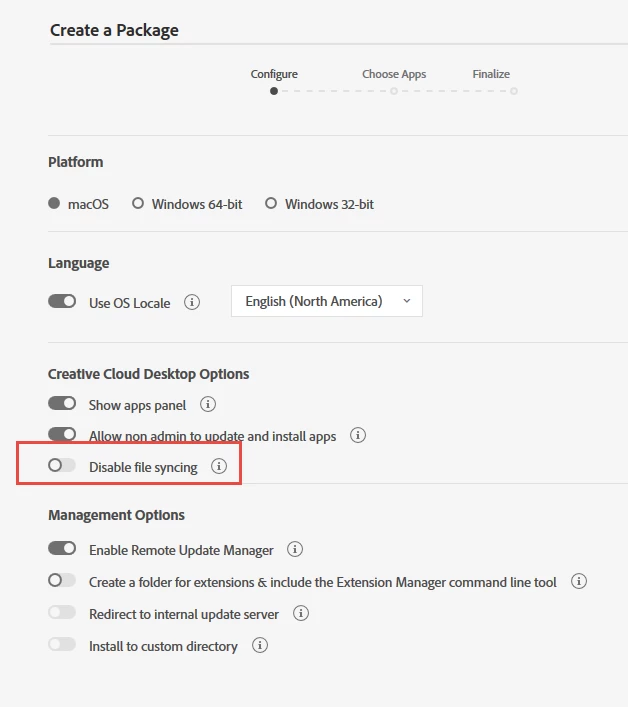
1. The Creative Cloud Desktop App allows sign in and sign out. If building a package for deployment via the Admin Console I recommend choosing the 'disable file syncing' option. This will prevent multiple storage folders being created on the shared device. (Note this is an Educational license only feature).

2. The Admin Console allows you to remove licenses from students and assign to others as needed. You can also do this in bulk via a CSV. Manage Users

3. You can bulk upload users via CSV. It is also possible to automate this process and build a connector with your Active Directory using the User Sync Tool. About User Sync

4. For details of exactly what is included in your agreement speak to your Adobe account manager - but storage would be part of a regular agreement.

You can find further information and contact details here - Creative Cloud for education | K–12 schools

I hope that helps.

1 reply

alisterblack
alisterblackCorrect answer
Inspiring
May 18, 2018

Hi,

Firstly I would encourage you to review our documentation for k-12 named user deployment here - Creative Cloud for education | Deployment Guide

1. The Creative Cloud Desktop App allows sign in and sign out. If building a package for deployment via the Admin Console I recommend choosing the 'disable file syncing' option. This will prevent multiple storage folders being created on the shared device. (Note this is an Educational license only feature).

2. The Admin Console allows you to remove licenses from students and assign to others as needed. You can also do this in bulk via a CSV. Manage Users

3. You can bulk upload users via CSV. It is also possible to automate this process and build a connector with your Active Directory using the User Sync Tool. About User Sync

4. For details of exactly what is included in your agreement speak to your Adobe account manager - but storage would be part of a regular agreement.

You can find further information and contact details here - Creative Cloud for education | K–12 schools

I hope that helps.