RexBalboa
Known Participant
November 6, 2017
Answered

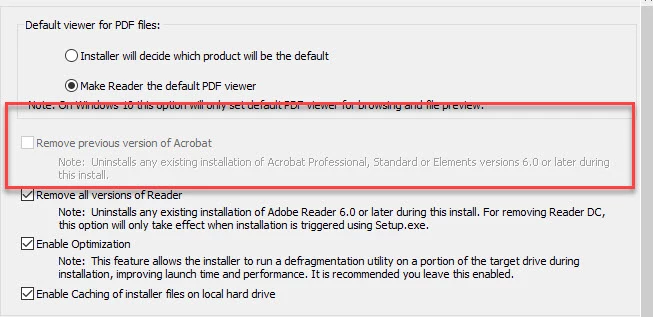
Option to Remove Previous Versions of Acrobat Grayed Out in Wizard

  • November 6, 2017
  • 2 replies
  • 3012 views

I am trying to customize Adobe Reader DC to remove any other versions of Acrobat found on the machine. The option is grayed out. How do I select this option or make this operation happen?

Thanks,

This topic has been closed for replies.
Correct answer Steve Cordero

A Reader installation cannot remove an Acrobat install by design.  If you need to remove Acrobat from machines you can use one of the prescribed methods in a pre-Reader Install script.

Windows cmd line and msiexec — Enterprise Administration Guide

Silent uninstallshttps://www.adobe.com/devnet-docs/acrobatetk/tools/AdminGuide/cmdline.html#silent-uninstalls

A silent removal runs without any dialog boxes to show the user that the removal is running. All products use the same command line and the same installer file for silent updates:

msiexec /x {[Package Name | Product Code]} /qn 

Note

You must include the braces in the command line. An MSI package name (e.g. AcroRead.msi) can be substituted for the Product Code. For Acrobat products, the Product Code is the GUID.


2 replies

Steve CorderoCorrect answer
Adobe Employee
November 6, 2017

A Reader installation cannot remove an Acrobat install by design.  If you need to remove Acrobat from machines you can use one of the prescribed methods in a pre-Reader Install script.

Windows cmd line and msiexec — Enterprise Administration Guide

Silent uninstallshttps://www.adobe.com/devnet-docs/acrobatetk/tools/AdminGuide/cmdline.html#silent-uninstalls

A silent removal runs without any dialog boxes to show the user that the removal is running. All products use the same command line and the same installer file for silent updates:

msiexec /x {[Package Name | Product Code]} /qn 

Note

You must include the braces in the command line. An MSI package name (e.g. AcroRead.msi) can be substituted for the Product Code. For Acrobat products, the Product Code is the GUID.

kglad
Community Expert
Community Expert
November 6, 2017