


Participant
Nov 4, 2026 2:50 PM UTC
Question

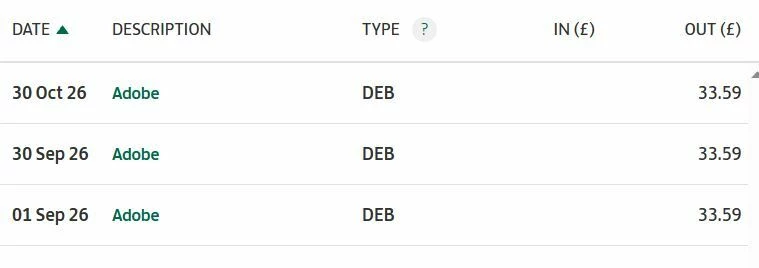
Payments are going out even though it says there is an issue

I am having payments going out even though I am receiving emails saying there is a problem. I have not been able to access photoshop for months and there is no where to cancel. Very unhappy especially when I am in and out of hospital with a very poorly husband. Who do I contact please
 

    5 replies

    Participant
    Nov 4, 2026 3:13 PM UTC

    There is no option to cancel plan


    Translate
    Community Manager
    Nov 4, 2026 3:20 PM UTC

    Hi ​@Helen229196914taf,

    Thank you for the screenshot, and we’re really sorry for the trouble this has caused. I can see that the Manage menu for your Photoshop plan only lists Add Licenses and Change Plan.

    Since the Cancel option isn’t showing, please go to the Support tab in the Admin Console and select Start chat to reach our Customer Care team. Once the chat ends, it’s saved as a case that you can track under Support > Support Cases. The steps are here: https://helpx.adobe.com/business/teams/get-help/contact-adobe-customer-care.html

    Please let us know how it goes, we’re happy to assist further.

    Thanks,
    ^AV

    Translate
    kglad
    Community Expert
    Community Expert
    Nov 4, 2026 3:00 PM UTC

    do you have a teams or enterprise subscription?

    Translate
    Participant
    Nov 4, 2026 3:03 PM UTC

    It was for personal use and this is what I was getting. Its saying I have no plan in my account but still taking payments


    personal use

    Translate
    Community Manager
    Nov 4, 2026 3:07 PM UTC

    Hi ​@Helen229196914taf,

    Thank you for reaching out. We’re really sorry you’re dealing with this. We understand the payments are still going out and you haven’t been able to find where to cancel.

    We can see your Photoshop plan is an annual plan, paid monthly, under Creative Cloud for teams. Cancellation is done in the Admin Console by a system admin or the contract owner of the plan:

    1. Sign in to the Admin Console (https://adminconsole.adobe.com/account) and select Account.

    2. Scroll down to Plans and licenses.

    3. Select Manage for the Photoshop plan, then select Cancel Licenses.

    4. Follow the steps on the Cancel licenses screen.

    Depending on your plan and renewal date, a cancellation fee or refund may apply. The full steps are here: https://helpx.adobe.com/enterprise/using/cancel-teams-subscription.html

    Please let us know how it goes, we’re happy to assist further.

    Thanks,
    ^AV

    Translate