

Inspiring
Nov 6, 2025 12:31 PM UTC
Question

Photoshop 2026 V27.0 can't start - dll errors on Windows 11 (Team Membership)

Updated Photoshop via Creative Cloud.

Now it won't start because of 3-4 dll errors like:
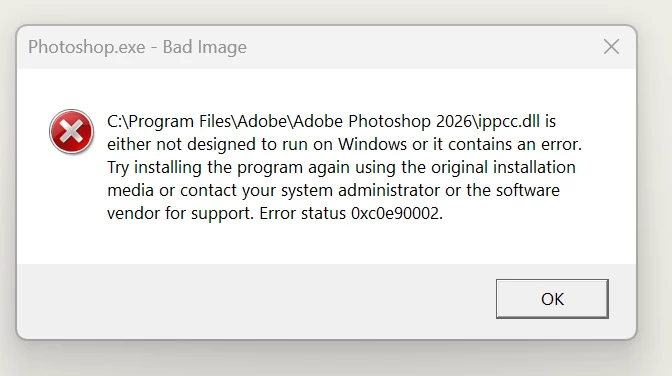


Tried to uninstall and reinstall - no avail

4 replies

kglad
Community Expert
Community Expert
Nov 6, 2025 12:42 PM UTC

repair all ms visual c++ versions that can be repaired (use google if you don't know how to do this)

update your ms visual c++, if it can be updated (use google if you don't know how to do this)


Translate
JayBeeMAuthor
Inspiring
Nov 17, 2025 8:05 AM UTC

I don't have permissions to do this on my workstation. Would be so much easier if the Photoshop update just included these things and actually just worked, as you would've expect.

I have reinstalled the previous versions until they get it right.

Translate
Kanikas
Legend
Nov 17, 2025 8:48 AM UTC

Hi JayBeeM, 


We hear you! Please follow the steps shared in this link for step by step instructions to resolve this:https://adobe.ly/4oKxx0t;


Hope this helps. 


Thanks 
^KS

Translate