


Question
Prevent Adobe Cache in User Profile (Terminal Server)
Hello,
I am Administrator of a Citrix Terminal-Server Environment.
Adobe Acrobat X and Adobe Reader XI is installed on our Terminal-Servers.
Of course we use Roaming Profiles saved on a central File-Server.
I'm trying to optimize and reduce the size of the User-Profiles.
I found out, that most profiles are big because of Adobe Cache.
Below you find a Screenshot of a user-Profile:
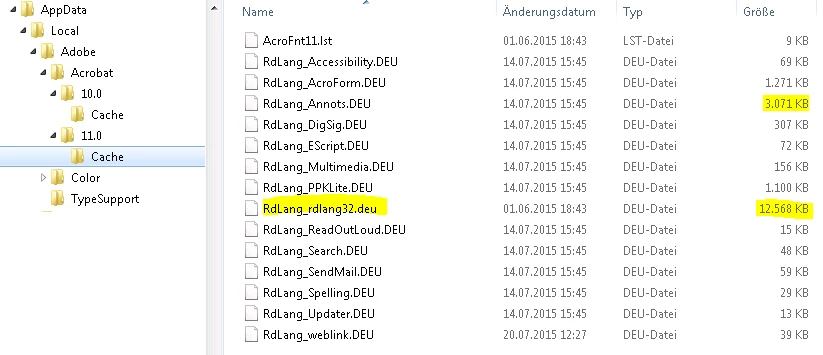
As you see there are big files saved in the Location:
%AppData%\Local\Adobe\Acrobat\10.0\Cache
%AppData%\Local\Adobe\Acrobat\11.0\Cache
The biggest files are: AcLang_exlang32.deu (10.0), CPRdLang_rdlang32.deu (10.0), RdLang_rdlang32.deu (11.0)
My Questions:
- Could I prevent Acrobat / Reader to save his Cache in the user-profile? (through a registry-key, or something similar ...)
- If it is not possible to prevent it - Could I reduce the size of Adobe Cache? (through a registry-key, or something similar ...)
- If both is not possible: I'm able to exclude Folders from sync. What would happen, if I exclude those Folders from sync. (To Roaming-Profiles on the central File-Server)
Thank you!
 AdChoices