


Jun 28, 2019 12:03 PM UTC
Answered

Prevent welcome page - Acrobat Reader 2017 Classic

We are installing Adobe Acrobat Reader 2017 Classic in our environment via SCCM.

I modified the MSI with the Customization Wizard.

When i restart the Acrobat Reader several times, suddenly the welcome page appears.
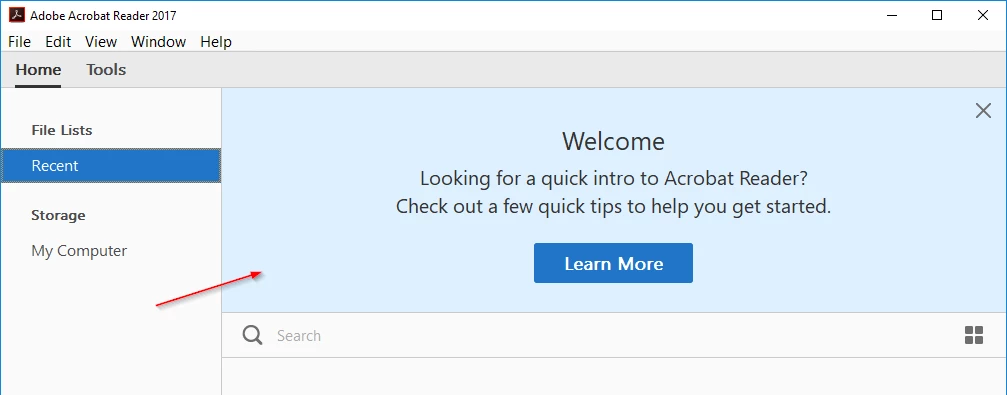
I investigate the problem and found out i have to set "bHideUnreadMsgAtLaunch" at "HKCU\Software\Adobe\Acrobat Reader\2017\AVGeneral".
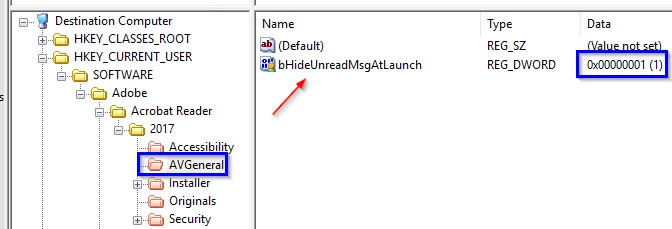
After the installation the key will not write down?!

I tried to write in "HKLM\Software\Adobe\Acrobat Reader\2017\AVGeneral" but same issue!

First the message are not appears, even a few restart of Acrobat Reader the message comes up.

In the registry the entry "bHideUnreadMsgAtLaunch" was wrote but with the wrong data (0x00000000).

Has somebody the same problem and could help me?

I don't understand why it's possible to add registry entry via MST but they will not applied.

Thanks!

[Question moved to Enterprise Deployment (Acrobat and Reader) by moderator]

This topic is closed to new replies. Start a new post to keep the conversation going.
Correct answer
Mar 18, 2020 8:35 AM UTC

@EnterpriseHelp any news about the problem?


Now it works to set the bHideUnreadMessageAtLaunch in HKCU.

10 replies

Sep 17, 2019 11:38 AM UTC

Is it possible, that the community forums was revamped?

My last replies are missing?!?!


@EnterpriseHelp any new ideas to solve the problem?

Translate
EnterpriseHelp
Inspiring
Sep 17, 2019 6:53 PM UTC

I knew there were forum changes pending, but I had no idea the switch would be this radical. Found this text on another forum that's not dead yet: 


"Between August 22nd through the launch date of September 11th, we will be transitioning our Creative Cloud, Document Cloud, eLearning Suite, and Technical Communication Suite community experience. During this time, we wanted you to be aware that all new threads posted and replies to existing posts in these forums will, unfortunately, be lost."


Anyway, I guess your config is still not working. This should be both simple and easy. I'll go bug some engineers. . . 


Translate
Oct 2, 2019 8:16 AM UTC
Do you have any news about the issue?
Translate
Jul 1, 2019 9:16 AM UTC

Sorry i don't know why my question is "probably answered" but it isn't yet.

I hope somebody can help me!

Thanks!

Translate
Jul 9, 2019 10:30 AM UTC

I can not believe that nobody has the same problem like me.

Is there an employee of Adobe?

Translate
EnterpriseHelp
Inspiring
Jul 9, 2019 3:41 PM UTC

I've never heard of the preference you mention. Where did you find the info?

Try bShowWelcomeScreen.

General Preferences

Translate