


Problems with installing Adobe CC Enterprise as well as Exceptions Deployer using SCCM 2012 R2
Hi,
I have asked other techies in TechNet but they haven't had much luck - I need to deploy both Exceptions and CC Enterprise through SCCM for my staff.
Initially I used the package build another techie gave me of CC Enterprise.
I had the Exceptions Deployer, and CC Enterprise set up as applications, not packages, in SCCM.
The notes I can find to assist me in the Adobe site are outdated, as it refers to SCCM 2007, NOT 2012 R2.
As the installation would hang on components I removed the dependence on installing Exceptions Deployer first.
I then created a package instead of an application, as Adobe notes say that it has to run as administrator.
This downloaded and appeared to run, but then I had this error log -
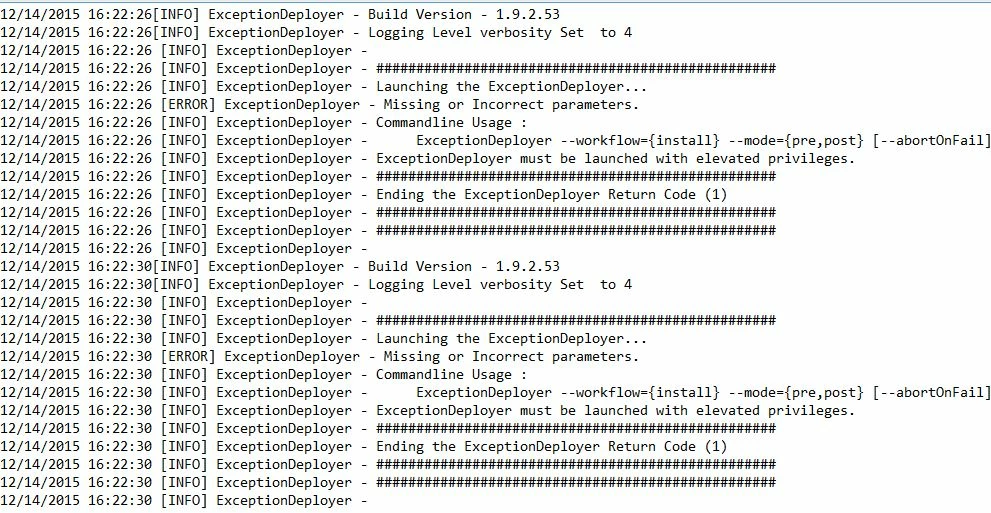
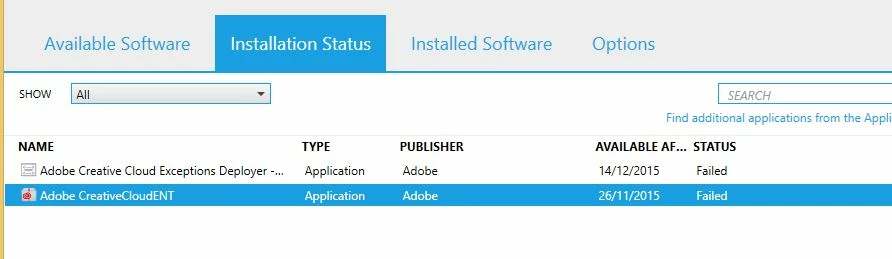
then despite it saying it has failed, it has appeared to install CC Exceptions (it is in C:\Program Files(x86)\Adobe) and there are icons on the desktop for Acrobat DC, Scout CC and also the Creative Cloud log in.
I have the package for Adobe Exceptions Deployer set to the following parameters -
ExceptionDeployer.exe --workflow=install --mode=post --installLanguage=en_US - yes i realised afterwards I don't necessarily need this parameter for language set as I installed Adobe CC ENT first.
And it is set as Run with administrative rights.
Can anyone advise me on how to install these 2 parts of Adobe CC so that it DOESN'T error out and give misleading errors?
Adobe CC ENT gives these errors in the AppEnforce log of SCCM -
| A user is logged on to the system. | AppEnforce | 14/12/2015 1:37:29 PM | 2436 (0x0984) |
| Performing detection of app deployment type Adobe CreativeCloudENT - Windows Installer (*.msi file)(ScopeId_0D7880B4-8A17-45FC-9F08-EC1D30E9B0F4/DeploymentType_79da0e94-8a55-4d90-a8c5-ca61ac72bab3, revision 6) for user. | AppEnforce | 14/12/2015 1:37:29 PM | 2436 (0x0984) |
| +++ Application not discovered. [AppDT Id: ScopeId_0D7880B4-8A17-45FC-9F08-EC1D30E9B0F4/DeploymentType_79da0e94-8a55-4d90-a8c5-ca61ac72bab3, Revision: 6] | AppEnforce | 14/12/2015 1:37:30 PM | 2436 (0x0984) |
App enforcement environment:
| Context: Machine | ||||
| Command line: msiexec /i "CreativeCloudENT.msi" /q | ||||
| Allow user interaction: No | ||||
| UI mode: 1 | ||||
| User token: not null | ||||
| Session Id: 1 | ||||
| Content path: C:\Windows\ccmcache\4 | ||||
| Working directory: | AppEnforce | 14/12/2015 1:37:30 PM | 2436 (0x0984) | |
| Prepared working directory: C:\Windows\ccmcache\4 | AppEnforce | 14/12/2015 1:37:30 PM | 2436 (0x0984) | |
| Found executable file msiexec with complete path C:\Windows\system32\msiexec.exe | AppEnforce | 14/12/2015 1:37:30 PM | 2436 (0x0984) | |
| Prepared command line: "C:\Windows\system32\msiexec.exe" /i "CreativeCloudENT.msi" /q /qn | AppEnforce | 14/12/2015 1:37:30 PM | 2436 (0x0984) | |
| Valid MSI Package path = C:\Windows\ccmcache\4\CreativeCloudENT.msi | AppEnforce | 14/12/2015 1:37:31 PM | 2436 (0x0984) | |
| Advertising MSI package | AppEnforce | 14/12/2015 1:37:31 PM | 2436 (0x0984) | |
| Executing Command line: "C:\Windows\system32\msiexec.exe" /i "CreativeCloudENT.msi" /q /qn with user context | AppEnforce | 14/12/2015 1:37:41 PM | 2436 (0x0984) | |
| Working directory C:\Windows\ccmcache\4 | AppEnforce | 14/12/2015 1:37:41 PM | 2436 (0x0984) | |
| Post install behavior is BasedOnExitCode | AppEnforce | 14/12/2015 1:37:41 PM | 2436 (0x0984) | |
| Waiting for process 2808 to finish. Timeout = 120 minutes. | AppEnforce | 14/12/2015 1:37:41 PM | 2436 (0x0984) | |
| Process 2808 terminated with exitcode: 1603 | AppEnforce | 14/12/2015 2:14:06 PM | 2436 (0x0984) | |
| Looking for exit code 1603 in exit codes table... | AppEnforce | 14/12/2015 2:14:07 PM | 2436 (0x0984) | |
| Unmatched exit code (1603) is considered an execution failure. | AppEnforce | 14/12/2015 2:14:07 PM | 2436 (0x0984) |
 AdChoices