
Participant
July 9, 2025
Question

"Share to review" button not working

  • July 9, 2025
  • 1 reply
  • 215 views

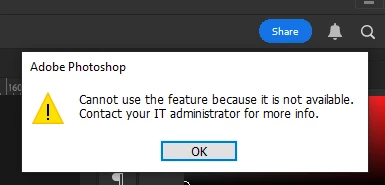
I am not able to use the "Share to Review" button to share designs with my team.
I have tried Uninstalling Photoshop and Creative Cloud multiple times. I have even disabled my antivirus to check if it was blocking it.
I have tried multiple methods from the Adobe Help Community and others. Still, the issue remains unresolved.

I would appreciate your assistance in this matter.


1 reply

jane-e
Community Expert
Community Expert
July 9, 2025

@Marketing37533093jg4b 


I've moved your post to the Enterprise & Teams forum. 


What happened you contacted your IT administrator?


Jane

Bani Verma
Community Manager
Community Manager
July 9, 2025

Hi @Marketing37533093jg4b,


Thank you for reaching out. I’ve reviewed your account and can confirm that it currently has an active Creative Cloud Individual subscription. This subscription is self-managed and typically does not have any usage restrictions.

However, if you also have access to a Creative Cloud for Enterprise subscription—perhaps provided by your organization—there are a couple of possible reasons you might be encountering this error:

  1. You may be signed in with an Enterprise subscription that your organization manages.
  2. Your IT team might manage your device, and certain restrictions could be in place.

Please confirm if either of these scenarios applies to you. This will help us better understand the issue and help you better.


I'm looking forward to hearing back from you.


Thanks,

^BS