


Inspiring
June 22, 2016
Question

Still major problems with CC updates

  • June 22, 2016
  • 11 replies
  • 1101 views

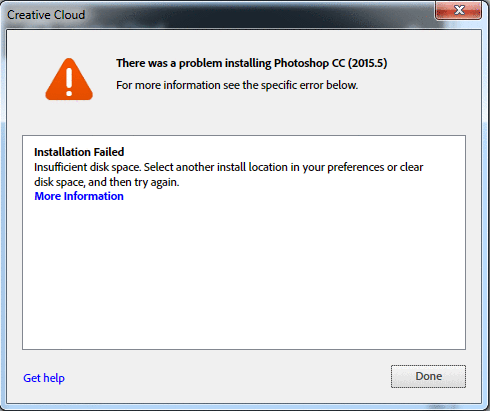
I have experienced a lot of problems with the CC updates. There's always some red error explaining that "I can't update" etc. Each time there's a new error. Sometimes it doesn't say anything, other times I receive messages, some less cryptic than others. The last time around I received this message telling me my disk

space is too low, but it can't be as I have 2GB free storage on my C:drive. These messages are new each time so I'm starting to believe this whole CC server concept is messed up. How many GB of space do I need for these update files? Surerly it can't be an authentic message? The last time I couldn't update the message was something clever like:  zxzxz/U%&/&%/%&64366457645////\\???.

What's up with this CC concept? It's been havoc since the beginning and that goes for ALL clients on ALL networks that I've been running this service. If I change the installation directory in the preferences I'm afraid that will mess up things even more as all the installations files are on the same directory at C:drive level. This is an enterprise license, meaning there's a great number of users on the same license administrated by the IT manager trough his control panel. However, my workstations is a stand-alone and when looking at the Adobe CC folder in the C: drive - Program files - Adobe - I can see the CC folders. The other drive is not a drive for exe files or installments, so I don't wanna mess that drive up with messy DLL files and exe files etc.

But again, the update "service" is always a mess with this CC concept. Makes me miss the hard copy versions where I never had to deal with these matters. 
    This topic is closed to new replies. Start a new post to keep the conversation going.

    11 replies

    alisterblack
    Inspiring
    June 23, 2016


    This is not a patch, it is a full binary.

    perrybrusAuthor
    Inspiring
    June 23, 2016

    So are you telling me that you expect users to keep adding hardrives to cater to the massive file size that's required to run updates? How many terrabytes will that mount up to in the years to come? You can't expect people to have dedicated IT managers with a huge backbone network to administrate space as the Adobe updates accumulates more and more space. I just don't get this.

    I had a chat with the IT manager at my workplace about this and he just shook his head. It's a nightmare. My private CC license is another story. I'm getting more than slightly worried about this issue - and so should you to be honest. So what's the fix? "Remote Update Manager is aimed at system admins" so what do you expect private users to do?

    alisterblack
    Inspiring
    June 22, 2016

    I built a package with the Photoshop update and it was 1.58 gb in total, when installing additional memory is required. So the error is correct. To make updates easier you might want to consider using Remote Update Manager and/or AUSST.

    perrybrusAuthor
    Inspiring
    June 22, 2016

    Jisses christ. In good Adobe fashion there's a book to read in order to fix issues that they should have made better from the start. Surely you can't expect people to actually spend weeks trying to understand that complex material?? Another aspect to this is that Adobe says the update files will overwrite the older version, so how come it accumulates this much space on my hard drive? I'm trying to install the latest PS update and I have 2GB of free disk space - is that update more than 2GB?! I can't go around deleting vital data on my program file drive just to make room for CC updates, there will be thousands of updates in the future so do you expect people to buy NAS systems with hundreds of terabytes capacity? I give up.

    alisterblack
    Inspiring
    June 23, 2016

    Remote Update Manager is aimed at system admins who are required to update multiple machines. So you may want to discuss this with your system admin if that is not your role.

    Photoshop system requirements

    "2.6 GB of available hard-disk space for 32-bit installation; 3.1 GB of available hard-disk space for 64-bit installation; additional free space required during installation (cannot install on a volume that uses a case-sensitive file system)"