
Participant
December 1, 2023
Answered

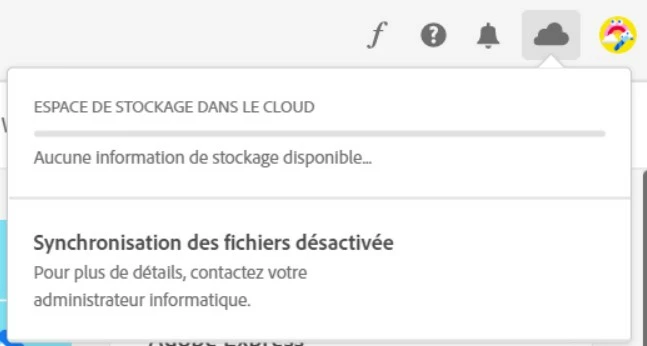
synchronisation des fichiers désactivée

  • December 1, 2023
  • 2 replies
  • 520 views

Bonjour,

La synchronisation des fichiers fonctionne bien avec mon compte admin mais pas pour les utilisateurs standards.

Le pack utilisé a pourtant bien l'option "activer la synchronisation des fichiers de coché".

Y'a-t-il une option en plus à activer pour que les utilisateurs puissent avoir la synchro active ?

version -- Adobe creative cloud version enseignement supérieur
This topic has been closed for replies.
Correct answer Nikhil R Gupta

@Renaud33286213b9mf 

What type of account do users have? A few situations I like to mention.

1. If the users are added as Business ID or Federated ID. If you have a free subscription like Adobe Express or Adobe Creative Cloud 2 GB. You may assign that.
CC free 

2. Navigate to the following location and locate the ServiceConfig.xml file. Check if there is any restrictions.

Windows: C:\Program Files (x86)\Common Files\Adobe\OOBE\Configs\
macOS: /Library/Application Support/Adobe/OOBE/Configs/

**You can also Quit Creative Cloud and the background processes and move the ServiceConfig.xml file to the desktop and then try to launch CCDA again and check.


2 replies

Nikhil R Gupta
Nikhil R GuptaCorrect answer
Legend
December 2, 2023

@Renaud33286213b9mf 

What type of account do users have? A few situations I like to mention.

1. If the users are added as Business ID or Federated ID. If you have a free subscription like Adobe Express or Adobe Creative Cloud 2 GB. You may assign that.
CC free 

2. Navigate to the following location and locate the ServiceConfig.xml file. Check if there is any restrictions.

Windows: C:\Program Files (x86)\Common Files\Adobe\OOBE\Configs\
macOS: /Library/Application Support/Adobe/OOBE/Configs/

**You can also Quit Creative Cloud and the background processes and move the ServiceConfig.xml file to the desktop and then try to launch CCDA again and check.


Participant
December 4, 2023

@Nikhil R Gupta Thanks Nikhil, I had to assign the 2GB subscription to make it work on Windows.

However, the fact is it worked already on macOS without us assign it. 

So a configuration issue might affect it as well. I'll check the ServiceConfig.xml 

Kevin Stohlmeyer
Community Expert
Community Expert
December 1, 2023

@Renaud33286213b9mf sync settings are core settings and not configurable:

https://helpx.adobe.com/enterprise/using/enable-disable-services.html

However CC synced files are being removed from the service -

https://helpx.adobe.com/enterprise/kb/eol-cc-synced-files-for-business-plans.html

Note the How Does this Impact my Organziation section

"Starting October 1, 2024, Adobe will begin discontinuation of the Creative Cloud desktop synchronization service and the folder and file sharing capabilities of synced files for businesses under Creative Cloud for Teams and Creative Cloud for Enterprise plans."