Participant
December 19, 2022
Answered

Team administrator cannot add user group admin

  • December 19, 2022
  • 3 replies
  • 403 views

Hello,


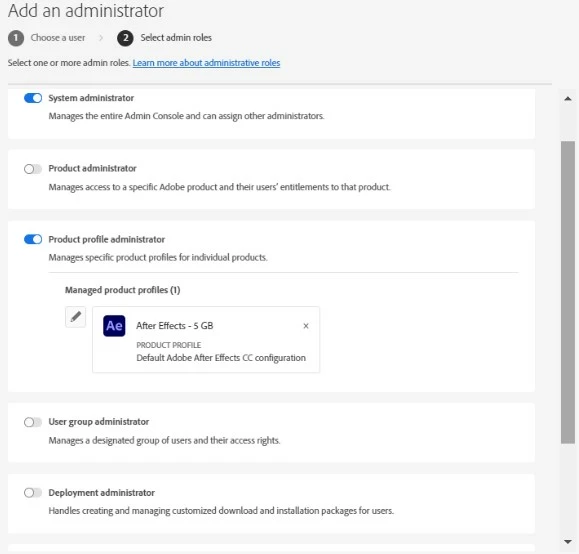
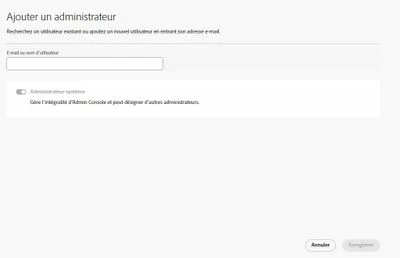
When i add an admin i should be able to say if it's an admin system, product, group or delivery but i ve only "system" available.

Im connected as the main administrator (and the only one for now)


This topic has been closed for replies.
Correct answer iCharles

Hi @DSI Globe ,


We have reviewed the account you used to post here and found that you currently use a Teams Subscription. The Administrative roles you are trying to assign are a part of the Enterprise plan only. In a Creative Cloud Teams plan, there can only be two types of Admin: Contract Owner and System Admin.


If you want to know more about different plans, you can request a consultation by clicking here.


Hope this helps!

Charles

3 replies

iCharlesCorrect answer
Legend
December 20, 2022

Hi @DSI Globe ,


We have reviewed the account you used to post here and found that you currently use a Teams Subscription. The Administrative roles you are trying to assign are a part of the Enterprise plan only. In a Creative Cloud Teams plan, there can only be two types of Admin: Contract Owner and System Admin.


If you want to know more about different plans, you can request a consultation by clicking here.


Hope this helps!

Charles

Abambo
Community Expert
Community Expert
December 20, 2022

If you have a Teams subscription, you can only create administrators. Only if you have an Enterprise subscription, you can distribute the roles to limit one or the other admin user to a specific task.

ABAMBO | Hard- and Software Engineer | Photographer
kglad
Community Expert
Community Expert
December 19, 2022

open the support tab on your admin console > start chat or start case or request expert session.


https://helpx.adobe.com/enterprise/using/support-and-expert-services.html