


Participant
April 19, 2022
Answered

Team Libraries workflow issues

  • April 19, 2022
  • 1 reply
  • 200 views

Hello!


I'm trying to sort out our Team Library and running into a lot of issues...


1. Am I right that Folders cannot be shared?

2. When we share files/libraries with 'Everyone' in our organisation, it doesn't share with 'anyone' despite this being set up in the Admin console?

3. Is there a way to set up a globally shared library? So rather than employees each having personal storage and sharing individual files and libraries, just having one shared storage for the company? Is this available within our current licensing (it's difficult to find this information out)? I was under the impression that this could be done with a Teams license?


Any advice you could offer would be gratefully appreciated!


Thanks.
This topic has been closed for replies.
Correct answer iCharles

Hi Shannon,


We understand that you are having issues with Team Libraries' workflows, To answer your questions:


1)Yes, You are correct that the folders cannot be shared.

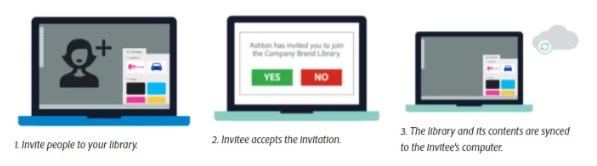
2)The users have to accept the invite in order to get access to the files been shared.

3)The Organisation has to be on Business Storage, i.e the storage tab in the Admin Console.


For further information regarding Creative Cloud Libraries for Business click here.


Hope this helps!
Charles.

1 reply

iCharlesCorrect answer
Legend
April 19, 2022

Hi Shannon,


We understand that you are having issues with Team Libraries' workflows, To answer your questions:


1)Yes, You are correct that the folders cannot be shared.

2)The users have to accept the invite in order to get access to the files been shared.

3)The Organisation has to be on Business Storage, i.e the storage tab in the Admin Console.


For further information regarding Creative Cloud Libraries for Business click here.


Hope this helps!
Charles.