
Participating Frequently
September 20, 2017
Answered

Turn off Creative Cloud updates

  • September 20, 2017
  • 1 reply
  • 8826 views

I am trying to deploy CC in an enterprise, but I want to control when the software gets updated. We are adding all the online services for our users, but we don't want them to be able to run their own updates. I have made packages with the updates disabled, but when I install the package and login a test user, they have complete control of their updates. I have been through all the deployment documentation and tried changing code in preference files, but nothing works. Any help would be greatly appreciated - this is very frustrating.
    This topic has been closed for replies.
    Correct answer alisterblack

    I've set the packages this way and get the same thing on the user's end. How do I remove the Apps panel? If that's an easy fix, I'd take it.


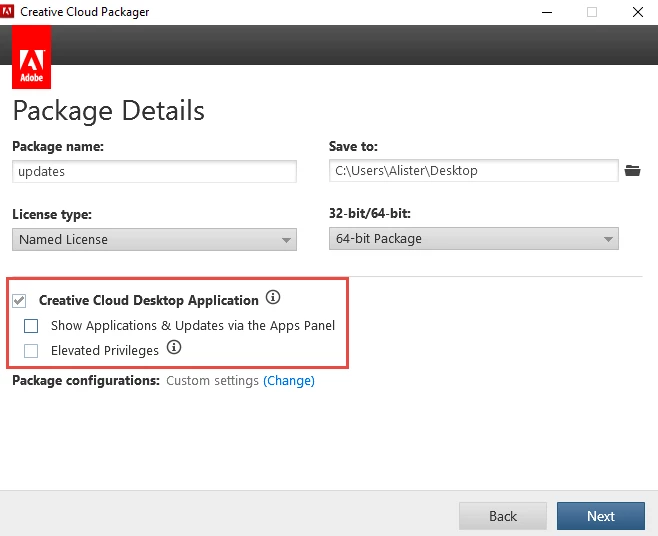
    That is also done in Creative Cloud Packager - uncheck the option shown below.

    This sets an option in "ServiceConfig.xml" - to set AppsPanel <visible> to false

    This can also be done manually.

    Locate the ServiceConfig.xml file.

    Windows: C:\Program Files (x86)\Common Files\Adobe\OOBE\ Configs\ServiceConfig.xml

    Mac OS: /Library/Application Support/Adobe/OOBE/Configs/ServiceConfig.xml

    In the file, locate the <visible> element and change its content as desired.

    <config>

        <panel>

            <name>AppsPanel</name>

            <visible>false</visible>

        </panel>

    </config>

    1 reply

    alisterblack
    Inspiring
    September 20, 2017

    Can you check for the AdobeUpdaterAdminPrefs.dat  file as noted in this document Disable auto-updates in Adobe Creative Cloud and Adobe Creative Suite 6 apps

    Participating Frequently
    September 20, 2017

    Thanks for the quick response! I did try that with no luck.

    Participating Frequently
    September 20, 2017

    Hi, No the Elevated Privileges option allows end users without admin rights to install CC apps, it is turned off as a default.


    That did work! Now, can I go into that code you showed above and turn this off in previous installations, or will I have to reinstall this package?

    Again, many thanks!