
Inspiring
September 23, 2025
Answered

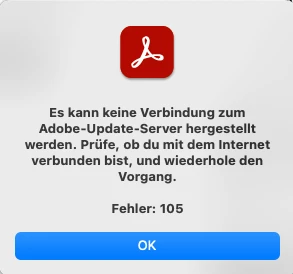
Unable to connect to the Adobe update server. Error 105

  • September 23, 2025
  • 1 reply
  • 243 views

As described in this ticket, updates for Adobe Acrobat and Reader no longer work on various Macs.

https://community.adobe.com/t5/download-install-discussions/unable-to-connect-to-the-adobe-update-server-error-105/m-p/15516249

I won't go into the details here, as they can all be found in the linked ticket.

Unfortunately, the last ticket was simply closed by the Adobe employee, even though there was no solution. I find this approach more than questionable, considering that we are all paying customers. If something like this happens again in this ticket, I will contact Adobe management directly.
 

Correct answer nohi79

Hi @nohi79,

Thanks for confirming and sharing your experience. I am sorry about the issue you are facing.
Could you please share the ticket number with me in a personal message if you have already raised one with our support team? If not, I recommend raising a ticket, as this will allow us to review the necessary logs and identify the root cause of the issue you’re facing with Acrobat.

If you already have a ticket, please send me the number via personal message. You can check this document for guidance on how to send a personal message in the community: https://adobe.ly/4nksEKT

If you haven’t raised a ticket yet, please do so by following the steps outlined in this document: https://adobe.ly/3VybJrW

Looking forward to your response. 

Regards,
^AN


@Anshul_Nautiyal  Miracles do happen after all. As of today, updates are working again on ALL computers. So, as suspected, it wasn't a problem on the clients, but Adobe solved the problem on the servers in general. I would have liked them to have taken the problem seriously earlier, but the main thing is that it's solved now.

1 reply

nohi79Author
Inspiring
September 23, 2025
Community Manager
September 23, 2025

Hi @nohi79,

Thanks for reaching out. As checked, you have an active Teams subscription associated with the Adobe ID you used to post this query. Can you please confirm whether this issue is isolated to Acrobat, or if you are experiencing the same with other apps as well? Please also confirm the users or devices affected, and whether you are able to open Acrobat or other apps.

If the issue is limited to Acrobat, have you tried the following steps:

Repair Acrobat:
Go to Help > Repair Installation within Acrobat to use the built-in repair function.

Please also confirm if you have tried the steps in this document: https://adobe.ly/4gH7vb8

If you have already tried this, please proceed with the steps below:


Configure your software firewall:

Temporarily disable your firewall to check if it’s causing the problem:

Please try these steps and let me know if the issue continues. I look forward to your response to the queries above.

Regards,
^AN

nohi79Author
Inspiring
September 24, 2025

Dear @Anshul_Nautiyal,


Please excuse me for being a little blunt here, but my/our patience is slowly running out. If you read the original ticket carefully, you will find that all your questions have been answered.

  • Yes, it only affects Adobe Acrobat and Reader.
  • All other applications can be updated.

The troubleshooting steps are not working! This is also described in the original ticket.
As you can see, several users have completely reinstalled their computers and reinstalled Acrobat. The error still occurs. Once again, this is not a problem on the clients, but on your side on the servers. We pay Adobe a six-figure sum every year. I would now ask you to take this issue seriously and contact Second Level Support as soon as possible. If we suffer any damage due to missing security updates, e.g. a successful hacker attack that exploits a security vulnerability, we will hold Adobe responsible!