Participant
August 26, 2020
Answered

VCRUNTIME140.dll error when I try to open Creative Cloud

  • August 26, 2020
  • 2 replies
  • 9643 views

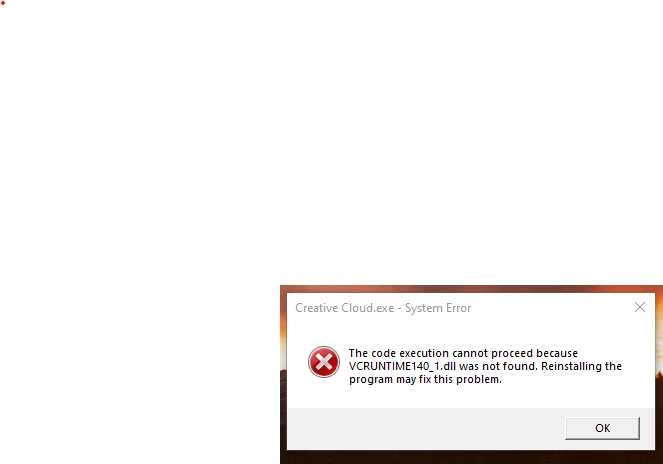
I have read related posts on this issue and they don't help. I installed Creative Cloud but when I try to open it, I get the message below. I updated Windows 10 before the CC installation. It should include the c runtime file the error refers to. I went to the Microsoft site to see if there was a seperate file I could install but the ones referenced in this forum are all for pre-Windows 10 systems. Any suggestions on how I can fix this? Thanks. 


This topic has been closed for replies.
Correct answer Nikhil R Gupta

Hello Bradley,


You can download the VC++ updates from 2008 to 2019. For 2015, 2017, and 2019 there is a single update. As John mentioned this is the link you can use Visual C++ downloads. You may try to uninstall and reinstall them and then try.


You can also try installing the Creative Cloud desktop application using the downloading the package using the link below.Make sure all the Adobe applications and processes are closed.

CCDA_WIN 


Another link that may help: https://helpx.adobe.com/creative-cloud/kb/missing-msvcp110dll.html


Thanks,

Nikhil Gupta


2 replies

NorbertWebb
Participant
March 8, 2021

uninstall all MS C++ runtime libraries of the system
restart Windows
install the MS C++ 2015 runtime library x64 (see above)
https://geeksadvice.com/fix-vcruntime140-dll-is-missing-error-on-windows/

John T Smith
Community Expert
Community Expert
August 26, 2020
Participant
August 26, 2020

Thanks John. Can you tell me which version of c runtime I need? I clicked on the second link you posted for latest supported visual c downloads and it lists several different versions. 

Nikhil R Gupta
Community Manager
Nikhil R GuptaCommunity ManagerCorrect answer
Community Manager
August 31, 2020

Hello Bradley,


You can download the VC++ updates from 2008 to 2019. For 2015, 2017, and 2019 there is a single update. As John mentioned this is the link you can use Visual C++ downloads. You may try to uninstall and reinstall them and then try.


You can also try installing the Creative Cloud desktop application using the downloading the package using the link below.Make sure all the Adobe applications and processes are closed.

CCDA_WIN 


Another link that may help: https://helpx.adobe.com/creative-cloud/kb/missing-msvcp110dll.html


Thanks,

Nikhil Gupta