



stefan1987
Participant
June 5, 2026
Question

We use Premiere 2018 in our company, because of compatibility with old plugin we need. From today Premiere 2018 shows unlicensed and offers Trial version only. Enterprise account is active, subscription is payed.

  • June 5, 2026
  • 2 replies
  • 65 views

Hello to all


Issue is that creative cloud sees the Premiere 2018 app, everything looks fine, enterprise account is alive and well, but when we try to open Premiere we get pushed to Sign In and then, after signing in, we get Trial option.
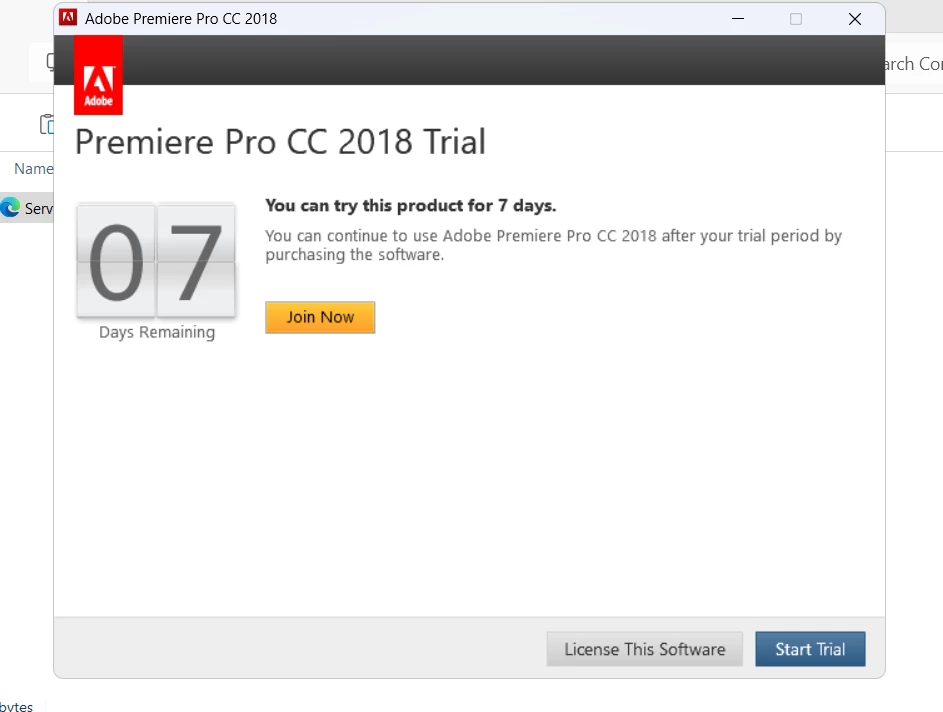


If we even try trial, we get looped back to sign in.

We installed latest Premiere and it works fine.

Is there some change in the licensing?


Thank you


    2 replies

    Ankit-AV
    Participating Frequently
    June 6, 2026

    Hi ​@stefan1987,

    Thank you for the detailed update — this actually makes the root cause much clearer.

    The issue isn't with the license assignment itself — it's a compatibility conflict between the CC desktop app version and Premiere 2018. When the CC app auto-updates to a newer version, it stops properly validating licenses for apps as old as 2018, because Adobe's support policy only covers the current and last 1–2 major versions. Premiere 2018 is now well outside that window, which is why the licensing breaks specifically after a CC app update.

    Unfortunately there is no clean technical fix for this — the behavior will keep repeating every time CC updates.

    Your realistic options:

    1. Raise this directly with Adobe Enterprise Support and request an exception or an extended support path for your 2018 deployment. As an enterprise customer you have more leverage than individual users — ask specifically about LTS (Long Term Support) version availability via Admin Console packages.
    2. Freeze the CC desktop app version across all machines at an older build that still validates 2018 licenses — before the update that broke things. This is possible via group policy or blocking CC app updates at the network/firewall level across all machines.
    3. Longer term — evaluate the plugin dependency. The 2018 lock is entirely because of one plugin. It may be worth contacting that plugin vendor directly to ask whether a newer compatible version exists or is on their roadmap — that unlocks your ability to move to a supported Premiere version.

      Regards,
      AV
    Ankit-AV
    Participating Frequently
    June 6, 2026

    Hi, not an Adobe employee but I've worked on enterprise CC deployments and this exact scenario — here's what I'd try.

    Premiere 2018 has a different licensing mechanism than newer versions. Start here first:

    1. Open the Creative Cloud desktop app → click your profile icon (top right) → Sign Out
    2. Sign back in — when the profile chooser appears, select Work or School Account, not personal
    3. Reopen Premiere 2018 and check if it's licensed

    If the issue persists, try the opm.db cache fix specific to CC 2018:

    1. Fully close Creative Cloud again
    2. Navigate to the OOBE folder:
      • Windows: C:\Users\[username]\AppData\Local\Adobe\OOBE
      • Mac: /Users/[username]/Library/Application Support/Adobe/OOBE
    3. Delete the opm.db file (a fresh one gets created automatically on next launch)
    4. Relaunch Creative Cloud, sign back in with Work or School Account, then reopen Premiere 2018

    If still not resolved:

    • In the Admin Console, confirm the Named User license is still actively assigned to the affected user(s) — renewals can sometimes briefly drop assignments
    • On Windows, open Services Manager → restart Credential Manager → relaunch Premiere
    • Check if a recent firewall/proxy change is blocking Adobe's licensing servers — refer to Adobe's network endpoints list and ensure required URLs are whitelisted

    One question that would help narrow this down: is this affecting one machine or multiple users across the organization?

    Hope this gets you unblocked quickly!

    stefan1987
    Participant
    June 6, 2026

    Hi Ankit


    Thank you for your response.

    We tried all of this options, but still with the same result.

    License is assigned.

    Credential manager didn’t help.

    Proxy and firewall are disabled for testing purposes


    This happens on all PCs when we log out someone from creative cloud, so multiple users are affected.


    Only time we were able to start Premiere is until Creative clod is fully updated, because we use one from package builder, but we can’t stop it from updating, we tried service disable, and a lot of other things, but nothing helped. While it is updating we can enter Premiere as trial only, but shows licensed.


    Thank you

    Stefan