


benjamins81319044
Participant
January 15, 2018
Answered

Windows gives me an Error when I try to add the msp to msi.

  • January 15, 2018
  • 1 reply
  • 751 views

Hi,

I have recently a Problem with adding the most recent msp file into the msi of Acrobat Reader DC.

  • MSI Version: 15.007.20033
  • MSP: Version: 18.009.20050

I downloaded the MSI seperatly from the Adobe FTP Server and I extracted it from the recent .exe file I get from Adobe - Weiterverteilung von Adobe Acrobat Reader DC

The Steps I take are the following.

  1. Run "msiexec /a AcroRead.msi" in a Command Window which I ran as Administrator.
  2. Extract files to a local destination (In my case C:\AcroRead\)
  3. Run "msiexec /a "C:\AcroRead\AcroRead.msi" /p "C:\users\XXXXX\downloads\AcroRdrDCUpd1800920050.msp" in the same Command Window from Step 1.

I get istantly the error upgradepath.jpg.
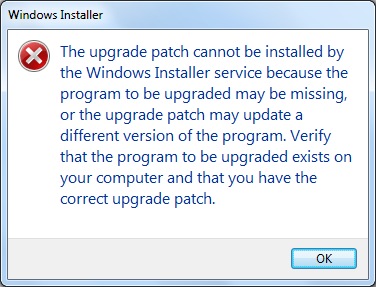
So, how do I resolve this Error?

This topic has been closed for replies.
Correct answer Steve Cordero

I put the MSI and the MSP file in the same directory and used the "TARGET" property to point it to a different direct.   However the installer still prompted me to type or browse to the correct directory.  Here is what worked for me in the Command Prompt on Windows 10.

Microsoft Windows [Version 10.0.14393]

(c) 2016 Microsoft Corporation. All rights reserved.

C:\Users\labuser\Desktop\AIP>msiexec.exe /a AcroRdrDC1500720033_en_US.msi /p AcroRdrDCUpd1800920050.msp TARGET="C:\Users\labuser\Desktop\AIP\BUILD\"

1 reply

Steve CorderoCorrect answer
Adobe Employee
January 19, 2018

I put the MSI and the MSP file in the same directory and used the "TARGET" property to point it to a different direct.   However the installer still prompted me to type or browse to the correct directory.  Here is what worked for me in the Command Prompt on Windows 10.

Microsoft Windows [Version 10.0.14393]

(c) 2016 Microsoft Corporation. All rights reserved.

C:\Users\labuser\Desktop\AIP>msiexec.exe /a AcroRdrDC1500720033_en_US.msi /p AcroRdrDCUpd1800920050.msp TARGET="C:\Users\labuser\Desktop\AIP\BUILD\"