


Participant
December 24, 2013
Question

LeapFrog Connect and Flash player 11.9 issues for Windows 8

  • December 24, 2013
  • 1 reply
  • 1268 views

Hello to anyone who can possibly help us.

On the Christmas Eve in NZ I am resurecting this post as I see a few other have had this same problem. We purchased LeapFrog2 Power Pack for our daughter on Amazon and had it shipped to NZ.

Upon connecting to LeapFrog Connect it asked us to install/update Adobe Flash Player - the same version that we already had on our laptop.  Nevermind, I have installed and reinstalled flash player and LeapFrog Connect; I even installed flash player for other browsers as suggested by the LeapFrog site http://leapfrog.custhelp.com/app/answers/detail/a_id/1971 but we are still having issues with picture displaying properly - what should be there, isn't there.

This is what we are seeing:
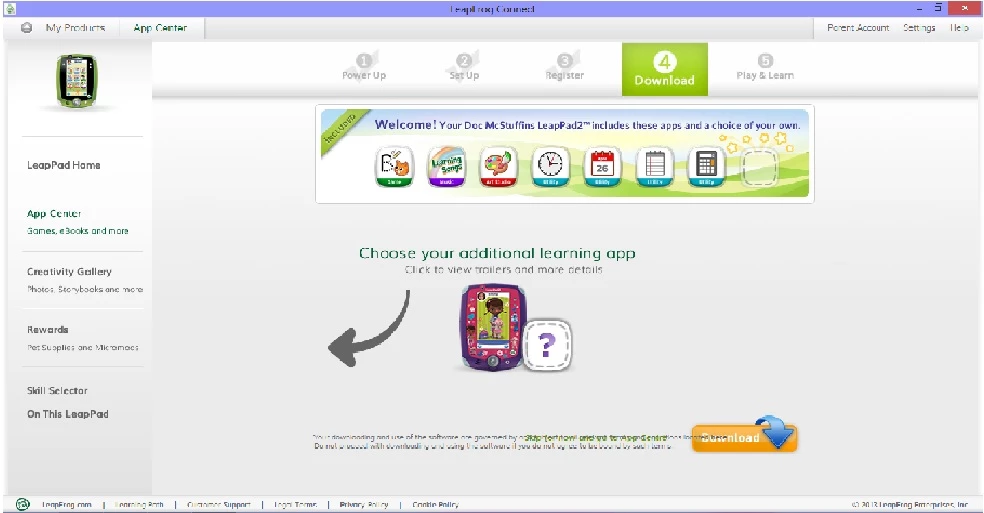
And this is what we should be seeing:
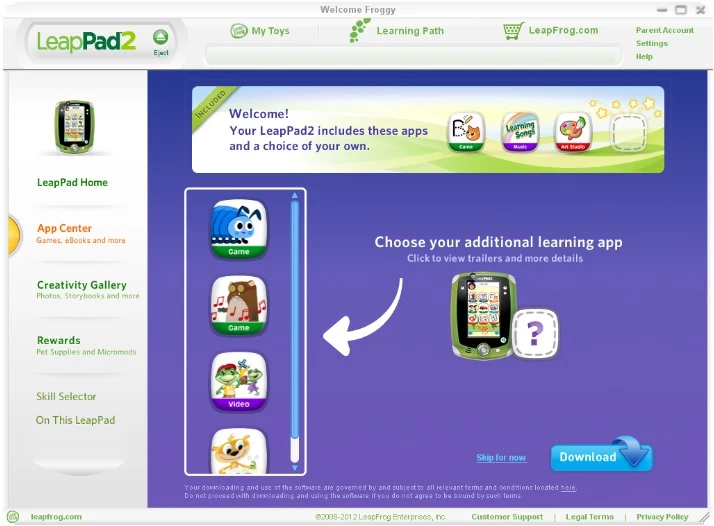
Help us please!

Many thanks,

Very frustrated parents.

    This topic has been closed for replies.

    1 reply

    pwillener
    Legend
    December 25, 2013

    I don't know what LeapFrog is.  But if it is Flash Player based, then it looks like "something" is displayed, even if it's not what you expect.

    I suspect it is a usage issue, rather than a Flash Player issue.  Does that thing come with a manual?

    OksanaAuthor
    Participant
    December 26, 2013

    Hi Pat, thanks for replying.

    LeapFrog is kids LeapPad educational tablet type device, and to download its apps I have to connect to their site called LeapFrog Connect.  The site is asking to download or update Adobe Flash Player.  I have it and it is upto date and I don't have any issues viewed other sites requiring Flash Player.  But I still cannot see the full content of the LeapFrog Connect. 

    The device does come with a quick user guide only.

    Thanks,

    Oksana