

Participant
October 4, 2013
Answered

sound not working on youtube

  • October 4, 2013
  • 3 replies
  • 9871 views

Hi my sound just started to not work on youtube. ive tried to reset my computer and nothing is working

    This topic has been closed for replies.
    Correct answer

    I've see this identical issue posted on other help forums.  Seems that YouTube, itself, is having some issues.

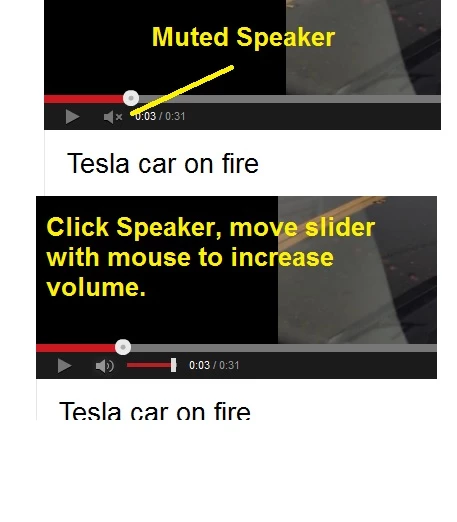
    I just tried a video, and there was no sound.  Then, I noticed that there was an "X" next to the speaker icon. I hovered the cursor over the speaker, clicked on the slider, and moved the slider all the way to the right, and BAM, normal volume again.

    From what I can tell, YouTube has set Muted Volume as the default.

    Hope this helps.
    3 replies

    C_F_McBlob
    Inspiring
    October 6, 2013

    Google has acknowledged a "glitch in their code" with YouTube, which I'll go out on a limb and assume is where this is occurring. There is NOTHING you can do in Flash Player to change this. You can use the volume slider (it appears when you mouse over the speaker icon) to adjust sound in the meantime.

    Participant
    October 7, 2013

    Thanks I am doing that and it's working!!

    [ really excessive quoting removed by admin ]

    Participant
    October 4, 2013

    Same problem here.  Oct 3 2013 10.30pm EST

    Charles

    Correct answer
    October 4, 2013

    I've see this identical issue posted on other help forums.  Seems that YouTube, itself, is having some issues.

    I just tried a video, and there was no sound.  Then, I noticed that there was an "X" next to the speaker icon. I hovered the cursor over the speaker, clicked on the slider, and moved the slider all the way to the right, and BAM, normal volume again.

    From what I can tell, YouTube has set Muted Volume as the default.

    Hope this helps.

    Participant
    October 5, 2013

    I have tried to click on the speaker but it doesn't change anything.

    Any other suggestions. PLEASE

    October 5, 2013

    Hi JJJJ...

    Instead of clicking directly  on the speaker icon, try moving  your cursor over the icon to see if the volume slider bar next to the speaker  appears.

    If it does, then click on the slider -- which appears in the second image, and drag it to the right.

    Please report back if ths works.

    OF