
Participant
June 4, 2023
Answered

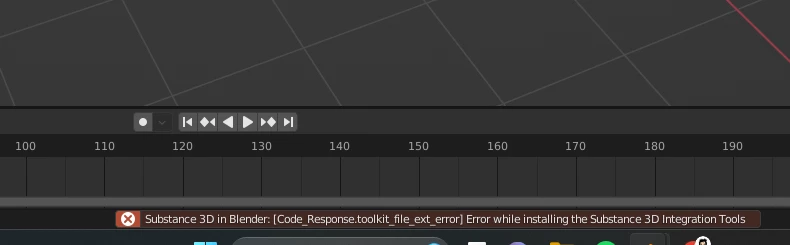
Error while installing the Substance 3D Integration Tools (Blender addon)
  • June 4, 2023
  • 2 replies
  • 2964 views


Hey everyone,


I'm on a windows PC and installing the Substance plugins for the first time.


I'm able to install the plugin, but the integration tools bug out every time I try to install.


It won't even install them, it just returns the error above.


I couldn't find any other topics that cover this error and would greatly appreciate your help!

This topic has been closed for replies.
Correct answer davescm

I've moved your post to Substance Plug Ins where you are more likely to get a response relevant to your issue.


Are you using the latest Plug in versions from here :

https://substance3d.adobe.com/plugins/substance-in-blender/

What version of Blender are you using?


Dave

2 replies

Imaginerie
Community Expert
Community Expert
November 29, 2023

Just highjacking this thread (sorry!) but wanted to point out that I'm unable to open the plug-in with Blender 4.01


I get this error message after installation and when I try to enable it

I downloaded it yesterday, from the official Substance plugin link
https://substance3d.adobe.com/plugins/substance-in-blender/


I'm a noob in Blender but I have loads of .sbar materials that I wanted to use in a new project.

Maybe I'm making one of those noob mistakes 😁

Let me know if there is something to be fixed!

Adobe Employee
November 29, 2023

Hi @Imaginerie , no probelm! Our current version of the plugin is not compatible with Blender 4.0, but we are actively working on a compatibility update.


Once it is ready, it will be pushed to our Blender Add-On V2 prerelease page. If you have not already, you can sign up for it here. It currently supports Blender 3.0-3.6, with the 4.0+ update coming soon.

Imaginerie
Community Expert
Community Expert
November 30, 2023

Thanks for the heads up. I am not technically proficient enough to be in a prerelease program for those plugins, I'm still learning Blender 🙂
It's just that I wanted to use all the materials I have already (as in bought) + those I get with the substance assets to be used within Blender since I cannot use Substance at the moment. It felt a bit silly to pay for assets I already have access to 🙂
If that makes sense...

Also I don't have the previous versions of Blender installed anymore so I'd have to wait anyway...
It's time to learn to create my own materials from scratch maybe. I'm not there yet. 😂

davescm
Community Expert
davescmCommunity ExpertCorrect answer
Community Expert
June 4, 2023

I've moved your post to Substance Plug Ins where you are more likely to get a response relevant to your issue.


Are you using the latest Plug in versions from here :

https://substance3d.adobe.com/plugins/substance-in-blender/

What version of Blender are you using?


Dave

WDIMAuthor
Participant
June 6, 2023

Fixed it !! I was two versions behind on Blender and didn't even think about that. Thanks for the quick response and solution 🙂

Participating Frequently
May 7, 2024

hello, you fix it? and the problem was becouse Did you have two blenders?