
mantask61739218
Participant
July 11, 2021
Answered

How to increase settings value step size

  • July 11, 2021
  • 1 reply
  • 424 views

Hello,


So at the moment I can only have two numbers after the point inside 3DS Max like shown here:
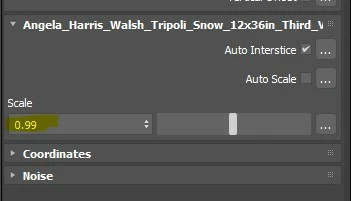
But it's not enough for me, how do decrease the step size even more? E.g. I need to have a value of 0.992 in this case.

Thank You

This topic has been closed for replies.
Correct answer Jill.T

Hi there! At this time there is not a way to refine beyond two decimals.

1 reply

Jill.TCorrect answer
Inspiring
July 29, 2021

Hi there! At this time there is not a way to refine beyond two decimals.

mantask61739218
Participant
August 3, 2021

Oh it's a shame then. I hoped I could make use of substance integration when working with my archviz projects and all the tiles I made inside substance designer. But for this to work I need an ability to fine-control tile grout width, and two decimels is just not enough for that. 
I really hope this could be improved/fixed? Doesn't sound like this "feature" would be a tough one to add.