
Participant
August 4, 2021
Answered

Material instance instead of material

  • August 4, 2021
  • 1 reply
  • 378 views

Hi, I have just started looking into using the Substance plugin for UE4, and ran into a problem when following this tutorial: https://substance3d.adobe.com/tutorials/courses/substance-in-unreal-engine-4/youtube-2qU4rJGQp8A


In the tutorial a material is created upon import, but when I follow the same method, I get a Material Instance instead, meaning I cannot open it in the Material Editor Graph. Does anybody know what I'm doing wrong?
This topic has been closed for replies.
Correct answer Jill.T

Hi @Catja5C5C! Glad you were able to find the solution! I will include the details from the prior forum post you linked above:


The plugin was refactored in 2020 (starting with v. 4.24.0.3) which included support for material instancing and introduced a new material template workflow - however you are able to still edit the material.

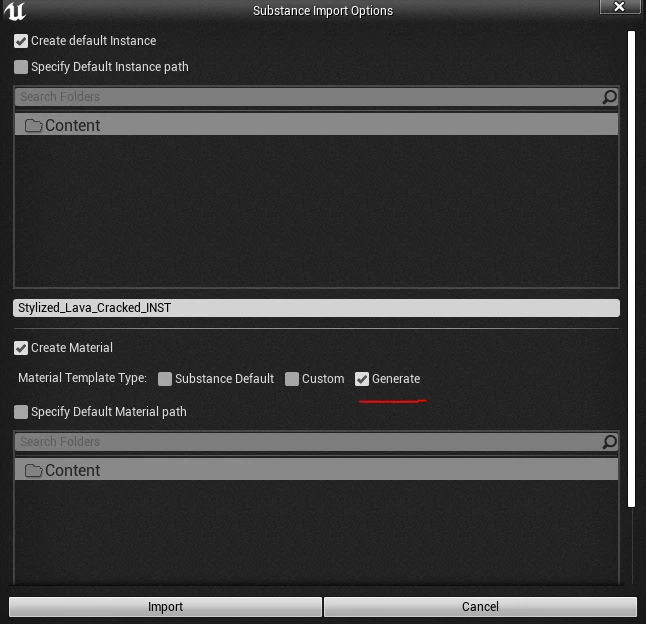
If you click the "Generate" checkbox on the import dialogue for an imported .sbsar it will give you both the material instance and the template material (where you can edit the material using the Material Editor). 


1 reply

Catja5C5CAuthor
Participant
August 4, 2021

Hi, found a solution for my own problem. If anyone else is struggling check this: https://forum.substance3d.com/index.php?topic=35904.0

Jill.TCorrect answer
Inspiring
August 4, 2021

Hi @Catja5C5C! Glad you were able to find the solution! I will include the details from the prior forum post you linked above:


The plugin was refactored in 2020 (starting with v. 4.24.0.3) which included support for material instancing and introduced a new material template workflow - however you are able to still edit the material.

If you click the "Generate" checkbox on the import dialogue for an imported .sbsar it will give you both the material instance and the template material (where you can edit the material using the Material Editor).