
Known Participant
July 21, 2021
Answered

New Substance 3D Blender Add-on broken

  • July 21, 2021
  • 2 replies
  • 8844 views

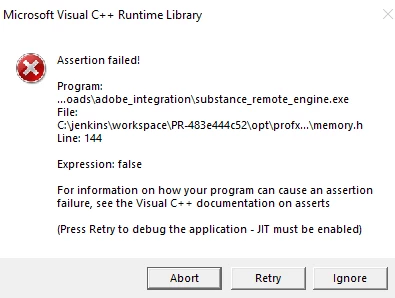
Stoked to use the new add-on with Blender, but this pops up every time I load Blender with the add-on and integration tools enabled, or when I try to install the integration tool via .exe from explorer. Any idea what's going on here?
 

This topic has been closed for replies.
Correct answer davescm

I've moved your thread to the 3D Plug Ins forum, where you may get more help with your issue. 

You mention installing exe via explorer. Installation should work just by pointing to the Zip file in Blender. First to install the add on then from the add on to install the integration tool.

Have you tried uninstalling as per the instructions with the Beta download links to remove old versions and re-installing as above?

Dave

2 replies

davescm
Community Expert
Community Expert
July 22, 2021

What version of Windows and Blender?

It's working correctly here in Windows 21H1 (19043) and Blender 2.93.1


Dave

Known Participant
July 22, 2021

Windows 20H2, 19042.1110


Blender 2.93, 3.0, 2.91, etc and Windows in general. Is it possibly related to having more than one version of Substance Painter installed? I don't know why that should be an issue though, as it seems to be Windows based in general?

davescm
Community Expert
davescmCommunity ExpertCorrect answer
Community Expert
July 22, 2021

I've moved your thread to the 3D Plug Ins forum, where you may get more help with your issue. 

You mention installing exe via explorer. Installation should work just by pointing to the Zip file in Blender. First to install the add on then from the add on to install the integration tool.

Have you tried uninstalling as per the instructions with the Beta download links to remove old versions and re-installing as above?

Dave

rayek.elfin
Legend
July 22, 2021

Which version of Windows are you using?