Participant
March 23, 2023
Question

Substance 3D plugin not working

  • March 23, 2023
  • 1 reply
  • 259 views

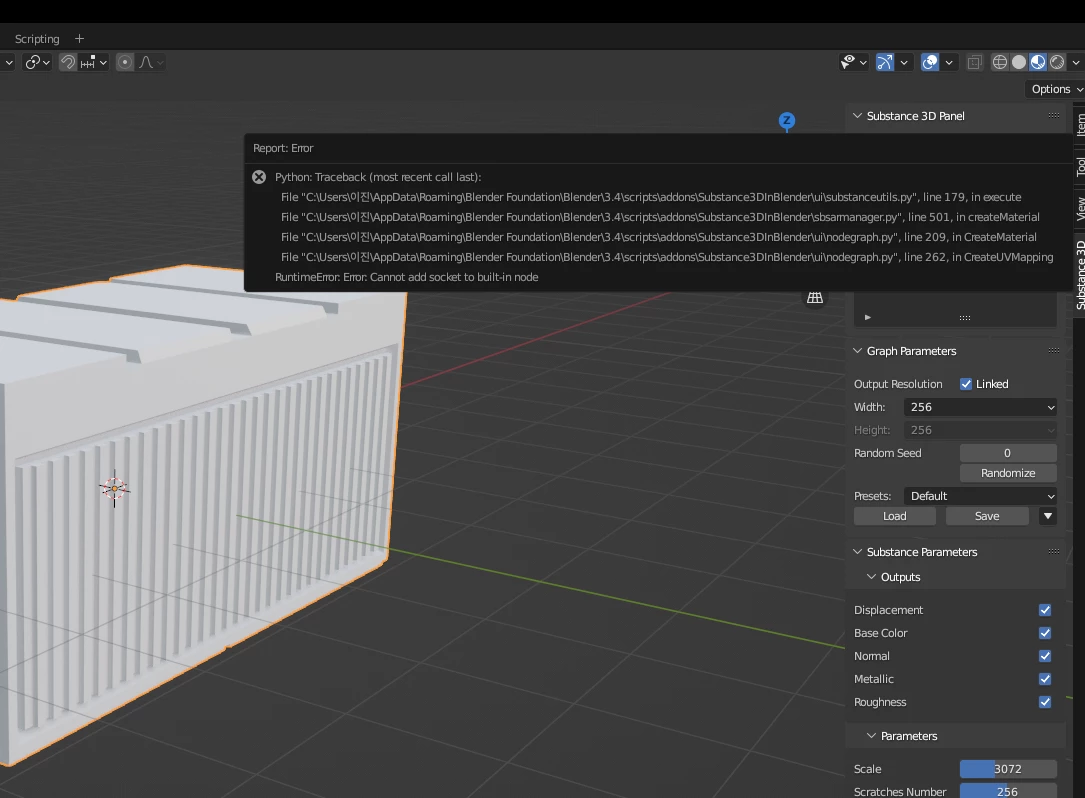
I am using Windows and I am using Blender 3.4 version. An error like the picture appears, how do I fix it?
 

This topic has been closed for replies.

1 reply

Adobe Employee
March 31, 2023

Hello @진23307264r9l0 this may be an issue with the integration tools. Could you please try manually removing the Substance3DIntegrationTools folder? The default location for Windows should be C:\Users\(username)\AppData\Roaming\Adobe. After that, could you please try re-installing the tools?
The latest version of the plugin and tools can be found here.

If this does not resolve the issue, could you open the Blender console by going to Window > Toggle System Console, and share the output of that window when you encounter the issue?
