Known Participant
November 26, 2024
Answered

Can we configure the Navigation View in FrameMaker to display each heading?

  • November 26, 2024
  • 4 replies
  • 631 views

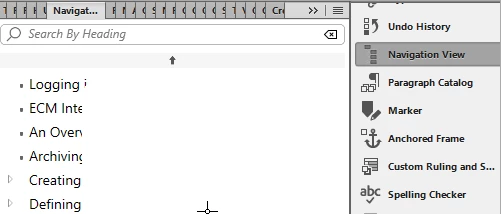
Can we configure the 'Navigation View' in FrameMaker to display Headings 1, 2, 3, and 4? In my document, it is currently showing only Headings 1 and 2.



    This topic has been closed for replies.
    Correct answer FrameMaker-dk

    You can change order etc if you use Klaus Daubes extension, which may be found here:

    https://www.daube.ch/docu/fmaker84.html

    It seem I have even made a video demo of it:

    https://www.youtube.com/watch?v=85VjiwJ7jVI

    4 replies

    FrameMaker-dkCommunity ExpertCorrect answer
    Community Expert
    November 29, 2024

    You can change order etc if you use Klaus Daubes extension, which may be found here:

    https://www.daube.ch/docu/fmaker84.html

    It seem I have even made a video demo of it:

    https://www.youtube.com/watch?v=85VjiwJ7jVI

    Bjørn Smalbro - FrameMaker.dk
    Known Participant
    December 2, 2024

    Thank you! This wil help.

    Community Expert
    November 27, 2024

    Here is another post about the navigation view feature:

    https://community.adobe.com/t5/framemaker-discussions/new-navigation-view-for-framemaker-documents/m-p/11294224#M66798

    Kuldip from Adobe mentions these pages with more information:

    https://help.adobe.com/en_US/framemaker/using/using-framemaker/user-guide/frm_basics_ba-documents_navigation_view.html#id204LHE00L5Z

    https://video.tv.adobe.com/v/32421t1

    You cannot configure which headings are shown.

    However, you can right-click and expand all headings. However, when I tested this with two of my files with slightly different structure, this worked only in one of the files.

    When you search in the Adobe Tracker for "navigation view", you get several descriptions of bugs and enhancements.

    https://tracker.adobe.com/#/search

    Known Participant
    November 28, 2024

    Thanks for the links! I’ll review the resources.

    Jeff_Coatsworth
    Community Expert
    Community Expert
    November 26, 2024

    That in Structured or Unstructured FM?

    Known Participant
    November 27, 2024

    Unstructured FM.

    Community Expert
    November 26, 2024

    Hi,

    Can you click on the small arrows on the left to open a heading folder?

    As far as I know FrameMaker uses a special algorithm to find the headings and corresponding subheadings. I did not find a way yet to influence which headings are shown and how.

    I guess FrameMaker uses the font size and the position of a heading for this.

    Best regards, Winfried

    Known Participant
    November 27, 2024

    I can click headings up to Heading 3. However, Heading 4 and other subheadings are not appearing.
