barbshoop
Participating Frequently
October 5, 2017
Question

Custom Master Page does not display on Master Page Usage

  • October 5, 2017
  • 1 reply
  • 478 views

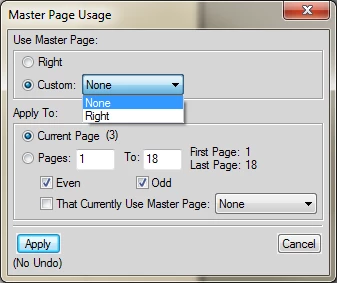
How do I get my custom master pages to display in the the Master Page Usage dialog?
This topic has been closed for replies.

1 reply

barbshoop
barbshoopAuthor
Participating Frequently
October 5, 2017

Maybe I don't understand the master page. I have a portrait document and I want a landscape page in the middle of it. I also have a landscape master page in a separate file. I added a Disconnected Page where I want the landscape page and thought I could apply the landscape master page to it, kind of like importing formats.

I followed Barb Binder's instructions but they aren't working for me.

Barb Binder
Community Expert
Community Expert
October 5, 2017

Hi barbshoop :

The default Left and Right masters (showing in your screen shot) are part of every new double-sided FrameMaker document.

When you perceive the need for additional master pages, you have to create them. It does not appear that you have done that yet. What instructions of mine were you following? Was it this post on the Rocky Mountain Training blog?

Adobe FrameMaker: Adding a Landscape Page to a Portrait Document - Rocky Mountain Training

~Barb

~Barb at Rocky Mountain Training
barbshoop
barbshoopAuthor
Participating Frequently
October 5, 2017

Yes, BarbBinder​. I was following the instructions in the Rocky Mountain Training blog.

Are you saying I need to create a new landscape master page every time I need a landscape page in a portrait document? Can't I have one already setup and use as a template? I do have several setup in separate files..
