Known Participant
October 19, 2018
Question

Edit original Illustrator file not working

  • October 19, 2018
  • 2 replies
  • 661 views

Maybe this belongs in the Illustrator forum, but I thought that I would check here first.

I'm working with FrameMaker 2017 (version 14.0.4.511). I usually insert Illustrator files directly into Illustrator. When I want to edit an Illustrator file, I click one and then press Esc > i > l to open the file in Illustrator.

Adobe pushed an update to Illustrator a few days ago (I think it's version 23.0). Anyway, when I try opening an Illustrator file from FrameMaker, Illustrator opens, but the file does not. Is anyone else seeing the same problem that I am?

Update:

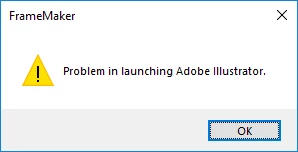
I uninstalled the most recent version of Illustrator and installed the one that I had yesterday. Now, I am seeing an error every time that I try opening the Illustrator file from FrameMaker.

    This topic has been closed for replies.

    2 replies

    Known Participant
    October 22, 2018

    My IT department doesn't like system restores, so I tried a full uninstall for Illustrator. (I had tried this earlier, to no avail.) This time, it worked, and I am back to normal. I'm confused, but at least I am not frustrated any more.

    Barb Binder
    Community Expert
    Community Expert
    October 22, 2018

    Hi Gregory:

    So it was something with the installation. I had that happen recently with Illustrator at well. It caused different issues but the full uninstall/reinstall took care of them. It's a regular CC issue that I don't see happening with the Tech Comm Suite applications.

    Anyway, glad you are back on track.

    ~Barb

    ~Barb at Rocky Mountain Training
    Barb Binder
    Community Expert
    Community Expert
    October 20, 2018

    Hi Gregory:

    I just tested this workflow with FrameMaker 2017 (v14.0.4.511) and 2019 (v15.0.1.430) and Illustrator 2019 (v23.0) and it worked as expected. Note that you need to have the artwork selected (and not the frame).

    And you did import by reference?

    ~Barb

    ~Barb at Rocky Mountain Training
    Known Participant
    October 22, 2018

    BarbBinder  wrote

    Note that you need to have the artwork selected (and not the frame).

    And you did import by reference?

    I double checked my selection. I had it selected.

    I always import by reference, but I checked that, too. It was imported by reference. Strangely, it seems as though FrameMaker isn't recognizing the Illustrator file as an Illustrator file.

    Anyway, I just tried going through the whole process again, and I am getting the same results.

    Barb Binder
    Community Expert
    Community Expert
    October 22, 2018

    Hi Gregory:

    What if Illustrator is already open when you use Esc il—does it work in that scenario?

    If it's a no, you might try a complete uninstall (even using the Adobe CC Cleaner tool to remove all traces) of Ai, then reinstall the version you want to use. (A regular uninstall will leave files behind scattered in various folders.)

    To test this for you, I installed AI 2019 on a Win 10 machine that already had Fm 2017 and Fm 2019 installed, and it worked as expected. I don't think you need to reinstall FrameMaker.

    ~Barb

    ~Barb at Rocky Mountain Training