
Known Participant
December 4, 2019
Question

Extra level showing up in HTML5 Output

  • December 4, 2019
  • 21 replies
  • 911 views

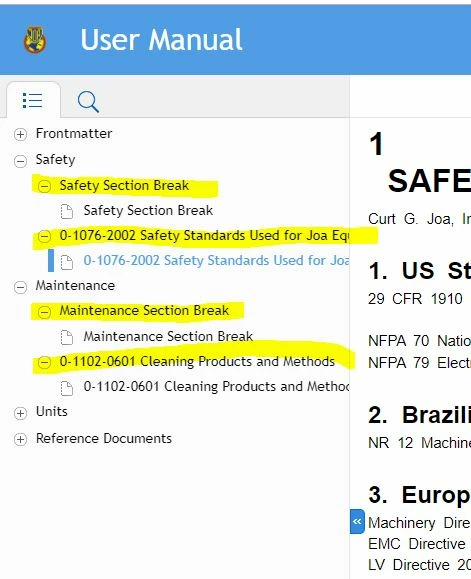
When I publish a FrameMaker unstructured manual to Responsive HTML5 using the Publish pod, the output has a navigation structure with extra levels that aren't really needed (shown in yellow below). How do I turn these off?


This topic has been closed for replies.

21 replies

Known Participant
December 5, 2019

I re-created my TOC and now it's working! 


Hezy A
Inspiring
December 8, 2019

Great

The help files for FrameMaker do not seem to explain how to make Responsive HTML that works.

They advertised a webinar on this subject this Thursday.

Maybe it will be helpful for you.

Jeff_Coatsworth
Community Expert
Community Expert
December 5, 2019

Let's have a look at the actual FM doc for that "Safety Standards Used for.." doc - what's in there that's triggering the heading...

Known Participant
December 5, 2019

I am now updated and still having the same problem.

Known Participant
December 5, 2019

I am now updated to 15.0.4.751 and still having the same problem.

Known Participant
December 5, 2019

Here is what it looks like when I try the charcoal layout. Same problem.

Community Expert
December 5, 2019

And can you update to the latest update 15.0.4.751?

apuwdm2
Inspiring
December 5, 2019

Hi,


Does the TOC for PDF work perfectly? We too had a similar problem with the HTML5 output but solved it by creating a proper TOC for the book. Please also ensure that the Add all Topics... checkbox is selected in the Style Mapping of HTML output. 


Regards

Apurva

Jeff_Coatsworth
Community Expert
Community Expert
December 5, 2019

I think that's a bit behind - try updating and regenerating.

Known Participant
December 5, 2019

Here is what my Frame book looks like. The HTML output seems to be making a navigation heading for each group I have in the Frame book because the "Frontmatter" heading is NOT in my TOC, but it is a group in my FrameMaker book as shown below.


Known Participant
December 5, 2019

I'm using the 2019 release version 15.0.2.503. I'm using Azure_blue layout. I'll try the Charcoal layout and see.