
Known Participant
December 4, 2019
Question

Extra level showing up in HTML5 Output

  • December 4, 2019
  • 21 replies
  • 911 views

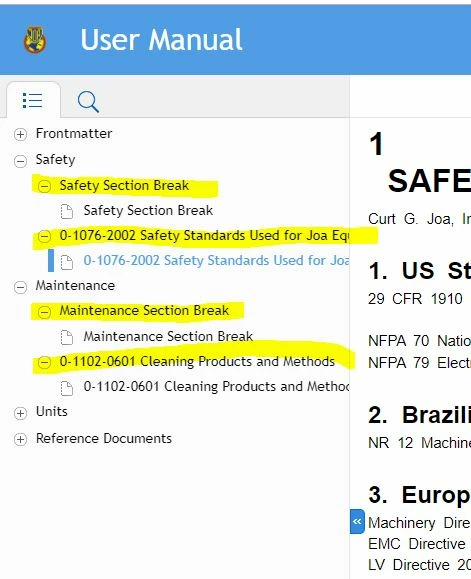
When I publish a FrameMaker unstructured manual to Responsive HTML5 using the Publish pod, the output has a navigation structure with extra levels that aren't really needed (shown in yellow below). How do I turn these off?


This topic has been closed for replies.

21 replies

Jeff_Coatsworth
Community Expert
Community Expert
December 5, 2019

And what version of FM are you using & what layout is being used? Is it happening if you try another layout or output format?

Jeff_Coatsworth
Community Expert
Community Expert
December 5, 2019

I'm pretty sure it's something to do with the styling applied to those unwanted headings - can you show us the FM screen where the topic appears?

Known Participant
December 5, 2019

I have a TOC in Frame for this book I'm testing, and I tried your settings as shown. I'm still getting the extra levels that a user has to click on to open something they can actually click on to go to that page. It just seems silly and unnecessary from a usability perspective. 


apuwdm2
Inspiring
December 5, 2019

Hi,


Please create a TOC for the book as you would do for making a PDF output. While generating HTML5, Framemaker's will adopt the same TOC for generating a navigation sidebar.


Regards,


Apurva


Hezy A
Inspiring
December 5, 2019

Hi

1. I find that in order for my HTML 5 help to appear correctly I need to have a Frame TOC file even if I do not use it in the Frame book; it needs to be part of the book which I am using to make the help.

I use the settings below which work, maybe you want to try?


Known Participant
December 4, 2019

The same thing is happening in a longer book that I do have a TOC for though. 

Jeff_Coatsworth
Community Expert
Community Expert
December 4, 2019

Since you're not using a TOC, I suspect that FM is using the indent levels to "figure out" what should be considered a heading in the TOC it builds.

Known Participant
December 4, 2019

I don't know but I don't think that's what's causing it because I tried a test where I unchecked that box and published the output and the same thing happened.

Jeff_Coatsworth
Community Expert
Community Expert
December 4, 2019

Is that "PageBreak" marker present with those headings that you don't want to show as headings?

Known Participant
December 4, 2019

I actually don't have a TOC for this Frame book shown in the example; we only do them for larger books. I'm not sure where to look to see what levels are generating topics. These are some of my settings: