


Known Participant
Dec 4, 2019 8:26 PM UTC
Question

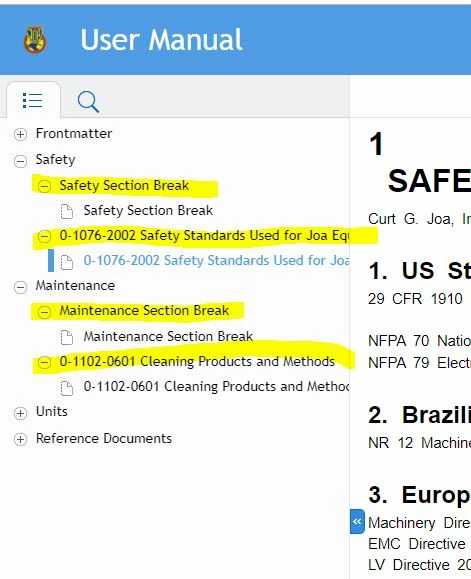
Extra level showing up in HTML5 Output

When I publish a FrameMaker unstructured manual to Responsive HTML5 using the Publish pod, the output has a navigation structure with extra levels that aren't really needed (shown in yellow below). How do I turn these off?


This topic is closed to new replies. Start a new post to keep the conversation going.

22 replies

Known Participant
Dec 5, 2019 7:20 PM UTC

I re-created my TOC and now it's working! 


Translate
Hezy A
Inspiring
Dec 8, 2019 7:17 AM UTC

Great

The help files for FrameMaker do not seem to explain how to make Responsive HTML that works.

They advertised a webinar on this subject this Thursday.

Maybe it will be helpful for you.

Translate
Jeff_Coatsworth
Community Expert
Community Expert
Dec 5, 2019 7:08 PM UTC

Let's have a look at the actual FM doc for that "Safety Standards Used for.." doc - what's in there that's triggering the heading...

Translate
Known Participant
Dec 5, 2019 6:53 PM UTC

I am now updated and still having the same problem.

Translate
Known Participant
Dec 5, 2019 6:53 PM UTC

I am now updated to 15.0.4.751 and still having the same problem.

Translate
Known Participant
Dec 5, 2019 4:15 PM UTC

Here is what it looks like when I try the charcoal layout. Same problem.

Translate
Community Expert
Dec 5, 2019 4:01 PM UTC

And can you update to the latest update 15.0.4.751?

Translate
apuwdm2
Inspiring
Dec 5, 2019 3:54 PM UTC

Hi,


Does the TOC for PDF work perfectly? We too had a similar problem with the HTML5 output but solved it by creating a proper TOC for the book. Please also ensure that the Add all Topics... checkbox is selected in the Style Mapping of HTML output. 


Regards

Apurva

Translate
Jeff_Coatsworth
Community Expert
Community Expert
Dec 5, 2019 3:52 PM UTC

I think that's a bit behind - try updating and regenerating.

Translate
Known Participant
Dec 5, 2019 3:43 PM UTC

Here is what my Frame book looks like. The HTML output seems to be making a navigation heading for each group I have in the Frame book because the "Frontmatter" heading is NOT in my TOC, but it is a group in my FrameMaker book as shown below.


Translate
Known Participant
Dec 5, 2019 3:38 PM UTC

I'm using the 2019 release version 15.0.2.503. I'm using Azure_blue layout. I'll try the Charcoal layout and see.

Translate