

TechWriterKat2
Inspiring
February 27, 2017
Question

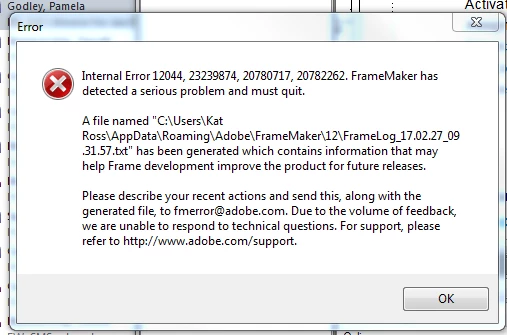
Framemaker 12 keeps crashing when attempting to update book
  • February 27, 2017
  • 2 replies
  • 1301 views

Can anybody help? This has been happening for the past two days whenever I try to update a book. It seemed to crash when encountering a cross-reference, which I deleted, but it still thinks it is there and continues to crash. I sent the log file to fmerror@adobe.com, and I also found something in this forum that sounded similar, but there were no specific instructions on how to fix it -- something to do with structured versus unstructured? I am on Windows 7 Pro. Thanks!

    This topic has been closed for replies.

    2 replies

    Barb Binder
    Community Expert
    Community Expert
    February 28, 2017

    Good morning, TechWriterKat2​.

    It seems like you have isolated the issue that is causing the crash/internal error, and have discovered the workaround. I'm all about doing whatever it takes to get my job out the door—ideally without curse words or tears. If moving the project folder over to a local drive to update it works, and moving it back meets the SCC requirements, then that's what I'd do until you can resolve the issues on the original drive.

    ~Barb at Rocky Mountain Training
    Barb Binder
    Community Expert
    Community Expert
    February 27, 2017

    What happens if you open all the files in the book prior to updating the book? (Shift + Open all Files in Book with cursor in the book window)

    ~Barb at Rocky Mountain Training
    TechWriterKat2
    Inspiring
    February 27, 2017

    Funny you should mention that, because another thing that was causing this same crash (last night) was selecting all the files in the book, and going to View-->Show/Hide Conditional Text.

    FYI, just tried what you suggested, and it crashed again.