
Known Participant
November 3, 2020
Question

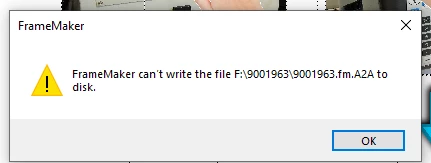
Framemaker cant write the file F:/ or C:/
  • November 3, 2020
  • 15 replies
  • 2072 views

I am still getting this error in framemaker, the only fix is to close the file and reopen and re-save . so far it seems to only be this file but i will know soon when i begin saving other files. Anyone have any other ideas? it happens when saving to C:/ or F:/ Drive

This topic has been closed for replies.

15 replies

pulkitn
Adobe Employee
Adobe Employee
December 15, 2020

Hi @beau5CC8 

There shouldn't be any issues in saving large files to any Disk (C: or F:).
Please mail to us with a brief description of the issue and if possible, a sample file on which we can reproduce the issue  "fmerror-reports@adobe.com" .

Someone will get back to you on this.

-Pulkit
-FM & FMS Engg.

beau5CC8Author
Known Participant
December 15, 2020

i am sending right now

pulkitn
Adobe Employee
Adobe Employee
December 21, 2020

Hi , 

Haven't heard from you over mail and hope the issue is solved at your end only.

-Pulkit

beau5CC8Author
Known Participant
December 14, 2020

well this is interesting, i located the 3 files that arnt causing the issue. the error came up on 1 page i just added from a previous save. i deleted the images and everything on the page. then the saved function worked again. I am copying the images in to the document always. Thoughts? @Bob_Niland @Jeff_Coatsworth @LinSims @Winfried Reng 

beau5CC8Author
Known Participant
December 14, 2020

3 files that are causing the issue*****

Jeff_Coatsworth
Community Expert
Community Expert
December 14, 2020

It's had an auto-save setting for many versions - what version are you using?

beau5CC8Author
Known Participant
December 14, 2020

using the newest version 2020 framemaker V.16.0.1

How can i set this up to frequently autosave, its funny you say that because when i had this issue originally i used the adobe help and they told me no such thing existed. i read the manual from framemaker from time to time. havent had alot of time to dive into it lately. 

Bob_Niland
Community Expert
Community Expert
December 15, 2020

Edit » Preferences » Global » General
☑ Auto Save Every [5] Minutes

[OK]

Jeff_Coatsworth
Community Expert
Community Expert
December 14, 2020

Don't believe - verify! Check that your User Profile is a local Admin and that if you check the security tab in File Explorer for the folders you are working in, that you have full rights.
Was FM installed as an Admin? Are you all patched up? How are you adding your graphics files - by copy or by reference?

beau5CC8Author
Known Participant
December 14, 2020

i noticed under the security settings nothing was absolute full control for all users, so i updated the information to full control for every user that appeared. I add them by copy, i dont want them added a reference because file locations may change. i am able to locate files quickly because they are organized into seperate folders. i am now wondering if changing the security settings to full control will help the issue. it still doesnt explain how it resolved the last time by removing some .png files.


alot of times i copy the the png grahic and add it to 20 pages, i dont use a master page because sometimes i change the directional arrow of the .png file. 


very strange...

Jeff_Coatsworth
Community Expert
Community Expert
December 14, 2020

The extensions on those files look like they are the temp files FM creates and destroys as it goes along saving. have you verified that you have full rights over wherever your files are being worked on? Is the F:\ drive an external or network drive?

beau5CC8Author
Known Participant
December 14, 2020

i believe i have full rights, i am the only person with framemaker..the last time i ran into this problem in a manual i went and removed these arrow icons because i noticed it started glitching up, in this current document i am adding like 40 photos off a shared folder i copy into document from the source file on the PC ( kind of alot going on here ). The elapsed time from the last save until i had the issue was 1.5 hours, i could save the document as a .mif file, but when opened the mif and tryed to resave the document back to a .fm file that would not worked. i read the mif washing but it will take me longer to figure that out then to redo the work and lose about 1 hour.


I am saving this file on the F:/ in hopes i dont have the issue arise again, i am adding the same content over again so maybe i can find out what file is causing the issue if i save every page and avoid placeing that file into the document.  I will update when i figure this out, in the process of trying to save the file in various ways framemaker quit responding so i am starting from the last save. i am going to keep updating this, being this is the second time i have had this issue in about 5 weeks.


*i am wondering if everytime i have this issue its steming back to a corrupted .jpg or .png file. i incorporate hundreds of files into these 100 page documents. its a service manual for automated equipment so it always contains alot of information. 

beau5CC8Author
Known Participant
December 14, 2020

Error happening in another unrelated document today, if i cant find a solution i am about to loose 1.5 hours of complicated work. 

beau5CC8Author
Known Participant
December 14, 2020

no matter what file i try and write to i am geting the issue, C:/ F:/ all of this work is being done on the computer hard drive..

beau5CC8Author
Known Participant
November 5, 2020

Update 11-5-20 

I left the document open for about 4 hours today, made suttle changes and no error when resaving. the true test will be next week when i go to finish up and add alot more content. I took out one graphic  that seems to be adding issues when i was copying/pasting or loading it. I will update the case when i get more informaiton. So far.so good

LinSims
Community Expert
Community Expert
November 4, 2020

Do you have graphics in the file? Sometimes graphics will cause issues. Try turning off the display of graphics?

View > Options > Graphics.


If that fixes it, they you need to track down the problem graphic.I've found that opening the graphic in an editing program and resaving it will often fix the issue.


beau5CC8Author
Known Participant
November 4, 2020

Hey Linsims,

Interesting you bring this up, in these service manuals i produce for equipment i use hundreds of pictures, 3-d models and png images. I have to be very careful i always select (copy into document) because i have had alot of issues when selecting (import by reference). i have noticed in several manuals i have done the image reference will be lost-even if the file has not moved. I didnt notice the issue arrise after i was copying and pages the same image. a computer screen icon onto multiple pages of the document. I wonder if maybe that image was imported by reference initially then i copied. Then moving the .fm file from one ssd to another ssd to the C:/ drive caused some kind of weird conflict. In future document this series of events would not happen again. I think i am going to erase the last graphic import pngs i inserted before this issue arrose with the particular document. Once i do that and re-save i will update this case

Community Expert
November 4, 2020

Hi,


You say that a fix is to close the file, open it again and re-save. Does this mean that sometimes you can save to F:\9001963\? Then this is not a general problem of this folder?

Can you save other files in other applications to this folder? E.g. from Word?


Best regards


Winfried

beau5CC8Author
Known Participant
November 4, 2020

when i close the document without saving, close framemkaer , re-open framemaker, re-open the document , make a suttle change and resave it saves fine. Its very weird, it now becomes inconvienent because this file(service manual) is nearly complete and i will have to save every 5mins to prevent any loss of data at this point. 

Jeff_Coatsworth
Community Expert
Community Expert
November 3, 2020

I'd suggest a MIF-wash to clean any cruft out of the problem file.