
Participant
August 30, 2023
Question

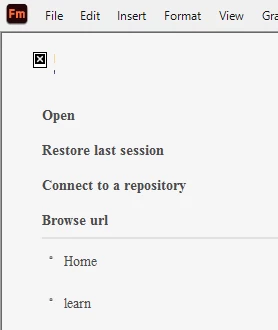
Framemaker version 17.0.2.431 Welcome Screen

  • August 30, 2023
  • 3 replies
  • 328 views

Just installed the latest FM update. Upon opening, the Welcome Screen looks like this image. Is there a patch to fix this like there was for a previous version? I was expecting to see the list of recently accessed files.
 

    This topic has been closed for replies.

    3 replies

    Jeff_Coatsworth
    Community Expert
    Community Expert
    August 31, 2023

    I'd give the FM folks a ping - see https://helpx.adobe.com/contact/enterprise-support.other.html#framemaker for your Adobe Support options. I'd recommend using the tcssup@adobe.com e-mail address as it reaches a team dedicated to Technical Communication Suite products including FrameMaker.

    Participant
    August 31, 2023

    Thank you for the contact info, Jeff! Will contact them.

    frameexpert
    Community Expert
    Community Expert
    August 30, 2023

    The recent files are stored in your maker.ini file in the 17 folder. This may get overwritten with the update, but I am not sure. Are they still listed in the File > Open Recent menu?

    Participant
    August 30, 2023

    Yes, the files are listed in the Open Recent menu. Here is what the Open Recent looks like (text blocked out for proprietary reasons):


    frameexpert
    Community Expert
    Community Expert
    August 30, 2023

    I am not sure why that happens but I have seen it before. The recents will be gone from the Welcome screen, but still in the Open Recent menu.

    Participant
    August 30, 2023

    Unfortunately not. I renamed the welcome.html file, opened FM, but there very minor changes to the Welcome Screen.