

grouping purely vertical lines
Hi.
I have used FrameMaker for many years, but only recently upgraded to FrameMaker 2019. I have the most recent build (15.0.3.603). I have tested this problem on systems running both Windows 7 Pro and Windows 10 Pro with the same result. Both operating systems are fully up to date.
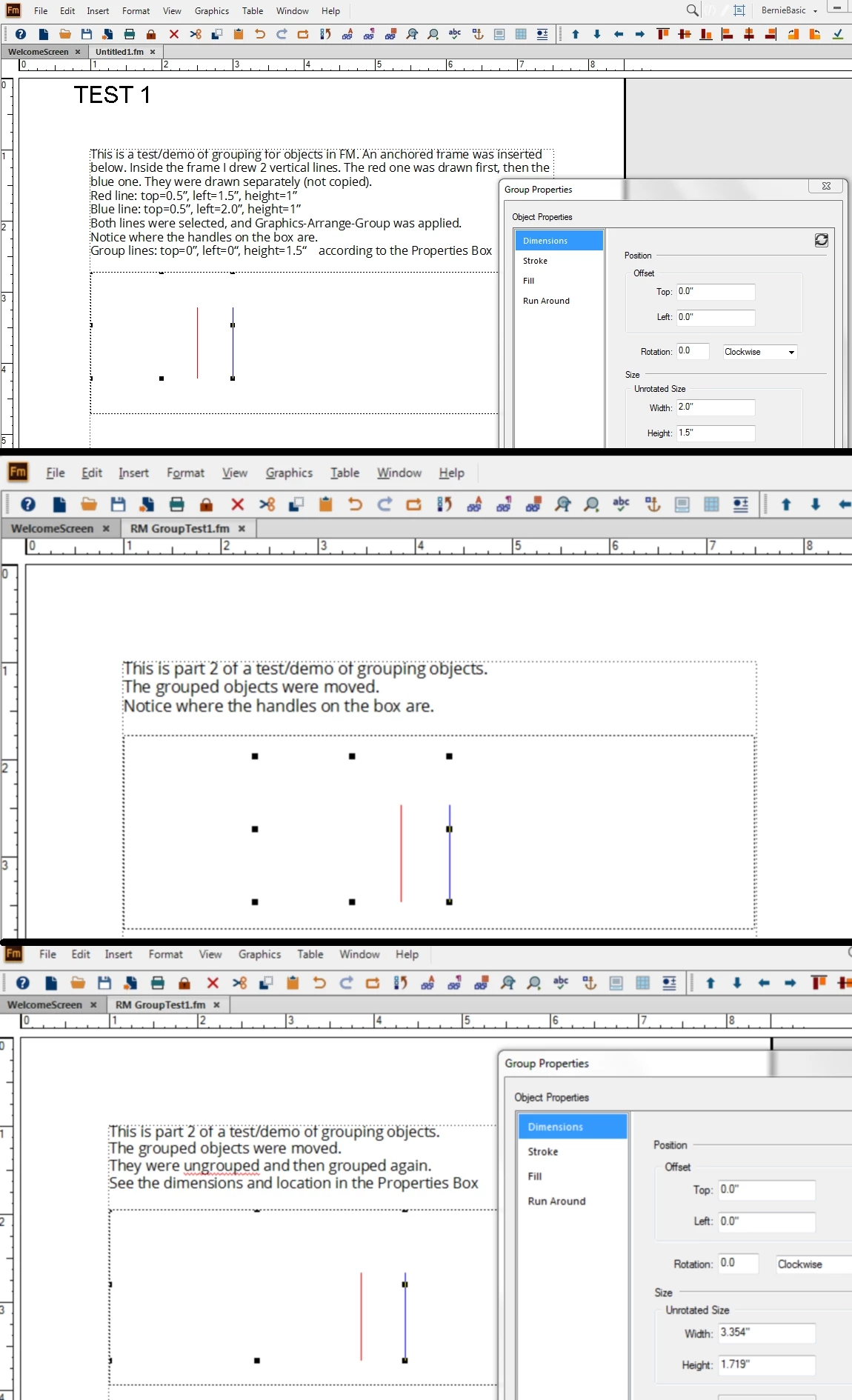
Here's the problem. Grouping two "pure" vertical lines (or one pure vertical line with one or more other lines in certain instances) fails, where a "pure" vertical line is created by holding down the shift key when drawing that line. The items become grouped, but the grouped object extends to the upper left corner of the page or the anchored frame. Once grouped, incorrect group dimensions are retained when that group is moved or aligned with other objects.
Steps to Reproduce: In either an anchored frame or a page with no frames, draw two "pure" vertical lines by holding down the shift key prior to drawing each line. Then, group those two objects. The group will show "handles" that extend the grouped object to the upper left corner of the page or anchored frame, thus giving the grouped object incorrect dimensions and properties that remain for future operations. The group object properties verifies the incorrect group dimensions.
I am attaching an image with steps and screen shots showing how to reproduce the problem in its simplest form.
Actual Result: The grouped object dimensions are incorrect, which makes it impossible to move, align, or otherwise manipulate the grouped object in any useful way.
Expected Result: The grouped object SHOULD have dimensions that extend only to the outer boundaries of the elements of that group. That is not true when grouping two purely vertical lines.
Any Workarounds: It appears that this only happens with "pure" vertical lines. Rotating just one of the vertical lines by 0.01 degrees sometimes causes a subsequent grouping action with another purely vertical line to be successful. This works, but is not always consistent and is not a good workaround because the object properties of the rotated line (rotated by 0.01 degrees) are not properly reported in the object properties pop-up menu, which just shows a rotation of 0.0 degrees, thus not showing that it had been slightly rotated.
Hardware Info: tested on two Intel CPU Windows systems. HP Spectre x360 laptop with Intel i7-8750H cpu, and Toshiba Portege Z30 with Intel i7-4600U cpu
Operating System: both Windows 7 Pro and Windows 10 Pro were tested; both are fully up to date
Graphics Info: The Toshiba system has Intel HD graphics. The HP system has Intel UHD graphics and NVIDIA GeForcs GTX 1050 Ti with Max-Q
I tried to file a bug report online, but that failed, so I'm hoping that someone here can help me to verify the problem and report the bug.
Thanks! Any help is appreciated.
-Stewart


 AdChoices