
rachelt14433776
Known Participant
December 10, 2018
Question

How to adjust bullet text, but not bullet?

  • December 10, 2018
  • 4 replies
  • 653 views

We were able to adjust the text and text color/font, without affecting the color of the bullet. However, we can't seem to duplicate this action. These are the settings where it is set up correctly:
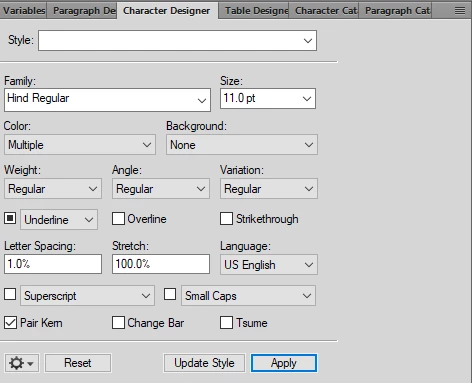
We must be missing a step but can't seem to figure out what that is. We change the text of the bullet to be blue as well, but here it says multiple.

This topic has been closed for replies.

4 replies

Barb Binder
Community Expert
Community Expert
December 14, 2018

Hi Rachel:

Just checking in to see where you are on your bullet formatting. Are you good to go? If not, please let us know.

~Barb

~Barb at Rocky Mountain Training
rachelt14433776
Known Participant
December 14, 2018

Yes! We were able to find a way to make it work. Thanks for checking in!

Legend
December 15, 2018

rachelt14433776, happy to see that you could achieve the desired result with the helpful answers from dauphinb and BarbBinder. It would be great if you could mark one of the answers as "Correct Answer" so that this thread can be closed :-)

Barb Binder
Community Expert
Community Expert
December 10, 2018

Hi Rachel:

This is the same situation that you ran into with the Note format.
Can you update the Note font in FrameMaker?

Big picture: When you set up auto-numbering in FrameMaker—for bullets, numbered lists, or text strings like "Note: "—you initially set up how the entire paragraph should look in Paragraph Designer. If you want the auto-number text to look different, then you set up a character style and swing back and assign it to the auto-number. I called this nesting a character style in a paragraph style in last week's post. And to help with your understanding of paragraph vs character formatting—we typically set up paragraph formatting for the entire paragraph first, and then add character formatting to update text strings within that paragraph.

In your case: set up the paragraph style to make the text the desired color. Then create a character tag to change the color back to black, and assign it the paragraph in Numbering properties.

~Barb

~Barb at Rocky Mountain Training
dauphinb
Inspiring
December 10, 2018

Have you tried creating a named paragraph style, with the bullet as its autonumber? That way you can give the bullet its own (named) character style, distinct from the default paragraph font:

Jeff_Coatsworth
Community Expert
Community Expert
December 10, 2018

Don't you need to give the character tag a name?

rachelt14433776
Known Participant
December 10, 2018

I didn't have to when we initially did this. Even when I do so, the bullet still changes to blue instead of only the text.

rachelt14433776
Known Participant
December 10, 2018

Also when I try to update the character designer for just the highlighted cross-reference, the original that is referenced changes as well for some reason.