

Inspiring
November 3, 2023
Answered

Negative spacing above paragraph doesn't work

  • November 3, 2023
  • 3 replies
  • 847 views

I am trying to align a Frame Above Paragraph graphic with following text as per the instructions given here: Runaround with 'Frame above paragraph' setting. The problem I'm having in Frame version 17.02 is that putting negative spacing in the Above Paragraph and Below Paragraph fields has no effect in this instance.  It does work on plain body text, however.

This is what I have: 
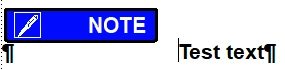
The graphic is in a Frame Above Paragraph setting in a paragraph style called Note and the text is in another paragraph style called NoteText. (The left margin in NoteText has been adjusted to get the proper horizontal spacing against the graphic.) I am trying to get the text and the graphic to align using negative spacing below Note and negative spacing above NoteText, but I cannot get it to work.


I'm pretty sure I'm missing something very obvious here, but I'm at a loss. 


Thanks in advance,

Bill


    This topic has been closed for replies.
    Correct answer Bob_Niland

    Is that 🖉 NOTE In a named frame on a Reference Page, and being invoked by Frame Above in a Body paragraph?

    And is the intent to have the banner on the same line as the Test text?
    If so, I don't think that FM feature can be tweaked to do so, and another approach will be needed.

    3 replies

    Barb Binder
    Community Expert
    Community Expert
    November 3, 2023

    "Part of the charm!" That made me laugh out loud.


    I was intrigued by your logic because I have used negative spacing values in the past, just not in that particular scenario. I went ahead and keystroked to see if I could figure it out, but of course, Bob was right. It might be worth logging as a future request on tracker. It would be much easier way of handling this specific situation. (That or being able to adjust the position on frames above and below.)


    ~Barb

    ~Barb at Rocky Mountain Training
    TCBillAuthor
    Inspiring
    November 3, 2023

    Judging by other posts I've read in this leprecaun hunt,  I think that Adobe has deprecated the negative spacing values capabilities such that now the only thing you can enter in the spacing field is a number greater than zero. I wonder why they would do that.

    Bob_Niland
    Community Expert
    Community Expert
    November 3, 2023

    My impression is that negative spacing was always a nearly-undocumented feature, with limited use cases where it would actually work, mainly Tables, and you had to put matching -#s in two places. I used it mainly to get Tables to sit on top of the {empty} anchoring paras, instead of below; very useful in two-column layouts.


    Separately, a position of Above Current Line would be broadly useful, as would Bottom of Page. Neither expected soon.

    Barb Binder
    Community Expert
    Community Expert
    November 3, 2023

    Hi @TCBill:


    I would either add the image as an anchored frame, or in a 2-celll table.

    https://www.rockymountaintraining.com/adobe-framemaker-icons/


    ~Barb

    ~Barb at Rocky Mountain Training
    TCBillAuthor
    Inspiring
    November 3, 2023

    Hi Barb,

    Thank you for the tips. Much to my chagrin, I went ahead and did the anchored frame bit. FrameMaker can be so frustrating sometimes, the way it dangles possibilities like this one but then razzes at you and says "Thank you for playing" when you try to do it.


    Oh well, that's part of its charm, I guess. 

    Bill

    Bob_Niland
    Community Expert
    Bob_NilandCommunity ExpertCorrect answer
    Community Expert
    November 3, 2023

    Is that 🖉 NOTE In a named frame on a Reference Page, and being invoked by Frame Above in a Body paragraph?

    And is the intent to have the banner on the same line as the Test text?
    If so, I don't think that FM feature can be tweaked to do so, and another approach will be needed.

    TCBillAuthor
    Inspiring
    November 3, 2023

    Hi Bob,

    Yes to both of your opening questions and great disappointment at your conclusion. Oh well. 

    Thank you for your help!

    Bob_Niland
    Community Expert
    Community Expert
    November 3, 2023

    I used to do a lot of those admonishment banners as FrameAbove, but thanks to ⚠Unicode and FM background color, I would probably now do them as in-line text, perhaps as Variables. But if you need boxed, esp boxed with rounded corners, an SVG import might be more suitable.

    See also back forum traffic on the curious matter of Safety Colors.