

K.Daube
Community Expert
Community Expert
June 20, 2023
Question

Noto Sans font family is not reliable

  • June 20, 2023
  • 1 reply
  • 3905 views

Two years ago I migrated my template from using the Lucida family created by Charles Bigelow (which I met personally in the 1990ies) to the more Uniccode savvy Noto family for the main text elements (body, lists, tables etc). In particular I wanted to use the condensed variation in tables.

  • I never got problems within FrameMaker:
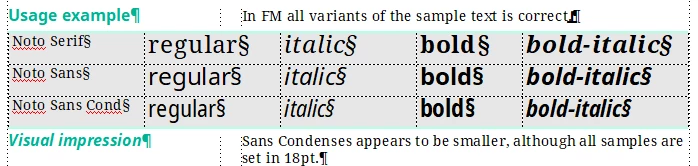
  • When creating a PDF via PDFL then the text areas with this font are blank - but use space.

    Recently I again was trapape the miniTOC did not appear in PDF. I had not correctly updated my styles and hence the Noto Sans Condensed dragon spit fire.
  • Creating the PDF via the Distiller route presents something, but this is garbage (not just a font substitution)

    This is independent of SaveAs or Publish.
  • In the PDF the font Noto Sans Cond is not listed at all - hence it is not found in Windows font folder (where all the fonts reside) - or there is another reason for this.

My personal circumvention of the Noto Sans Condensed problem: Use Noto Sans and apply stretch 85% which (at least for me) gives the same visual impression.

References to this problem:

https://forums.adobeprerelease.com/framemaker/discussion/176/pdfl-does-not-find-installed-fonts-noto-sans-con
https://community.adobe.com/t5/framemaker-discussions/font-noto-sans-cond-does-not-behave-in-pdf-creation/m-p/11269787#M66680
https://community.adobe.com/t5/framemaker-discussions/pdf-converted-from-framemaker-8-become-unsearchable-noto-sans-tc-sc-jp-kr/m-p/13438470#M77517

This topic has been closed for replies.

1 reply

Bob_Niland
Community Expert
Community Expert
June 20, 2023

Might this be due to it being a Variable font?

K.Daube
Community Expert
K.DaubeCommunity ExpertAuthor
Community Expert
June 21, 2023

I haven't seen any notion that Noto is a variable font. At least I get no answer on my question "is Noto a variable font" by google. And Google Fonts don't give any hint on the Noto page. A typical discription is this from typogram.co:

Noto is one of my favorite open-sourced font family of all time due to its extensive language support. Noto is a joint project by Google, Adobe, and Monotype to eliminate “Tofu,” which is the box that shows up when there is a missing character. Noto has italic styles, multiple weights, and widths, 3,741 glyphs, and supports 800 languages.

From all the avialable ttf files in Noto-hinted.zip I have installed these:

The last one is used for examples of RTL text.

The Condensed variants are only installable, while all others are editable. According to Microsoft that means:


  • Editable — The font supplier allows the font to be embedded within a document and allows the document to be edited using that embedded font.
  • Installable — This is the most permissive setting. The font supplier allows the font to be embedded within a document, and permits the document viewing application to permanently install the font on the user’s computer. Most applications treat these fonts like those set to Editable embedding.

My understanding of the Installable therefore is that it can not be embedded in PDF... Why this is the case only for the condensed variant is beyond my understanding.

Unfortunately Dov Isaaks is no more in our boat - he probably could enlighten me.


Bob_Niland
Community Expert
Community Expert
June 21, 2023

Perhaps another dead-end speculation, but how do the working and rubbished Noto fonts compare in codepoint coverage?

Specifically do the failed fonts include codepoints above BMP (above U+FFFF)?

FM doesn't yet support the Supplementary Planes (U+10000 and up), and I don't know what happens if you use a font that populates that region of the codepoint space. This is feature request FRMAKER-10976, just to forestall further filings.