Known Participant
November 10, 2022
Answered

TOC Second Line Formatting (LOCKED: Duplicate Post)

  • November 10, 2022
  • 1 reply
  • 199 views

Hi,


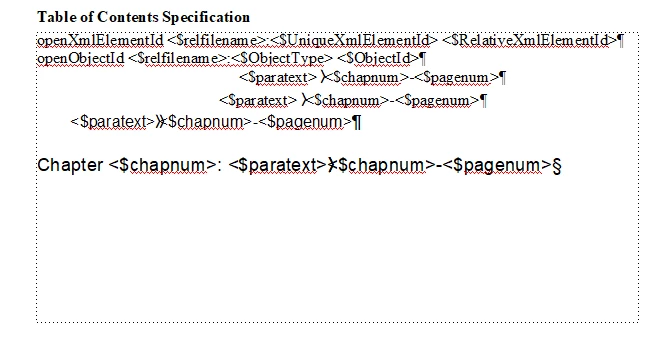
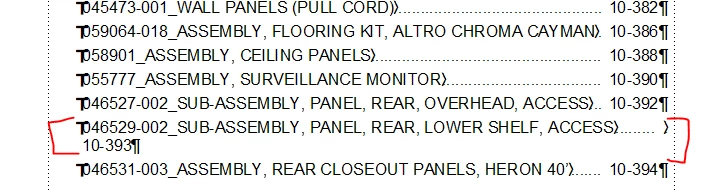
I'm having issues getting the second line of a TOC to tab to the right of the page, but only when the chapter and page numbers are the only text on the second line. The only way I can get it to appear correcly is if I manually tab to the left of the chapter number. I'd like for this to format automatically if I can. I'm using FM 2017, and I've tried everything I can think of. Please see an example below. Thanks, Nick
 

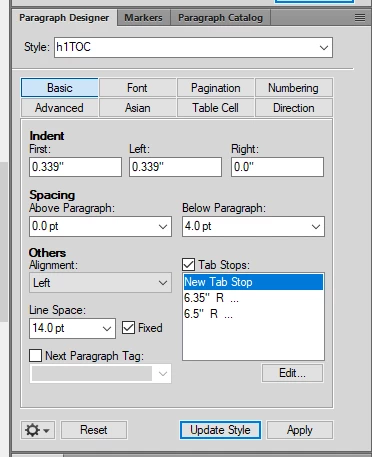
My Reference Page and Paragraph Designer settings:


    This topic has been closed for replies.
    Correct answer Barb Binder

    Hi Nick:


    Isn't this the same question as your previous post? Let's continue the discussion over there. This helps future users with the same question because we have already clarified the background (versions, etc) behind it and the correct usage of a last line right indent for those on the Fall release 2022 or later.


    Please see: https://community.adobe.com/t5/framemaker-discussions/line-formatting-in-list-of-figures-tables/m-p/13316912#M76846


    ~Barb

    1 reply

    Barb Binder
    Community Expert
    Barb BinderCommunity ExpertCorrect answer
    Community Expert
    November 10, 2022

    Hi Nick:


    Isn't this the same question as your previous post? Let's continue the discussion over there. This helps future users with the same question because we have already clarified the background (versions, etc) behind it and the correct usage of a last line right indent for those on the Fall release 2022 or later.


    Please see: https://community.adobe.com/t5/framemaker-discussions/line-formatting-in-list-of-figures-tables/m-p/13316912#M76846


    ~Barb

    ~Barb at Rocky Mountain Training