

K.Daube
Community Expert
Community Expert
November 4, 2021
Answered

What's wrong with this find-replace script?

  • November 4, 2021
  • 5 replies
  • 578 views

Dear all,

Colleague Thomas Becker used some of my scripts from the collection FMjsxLib to do this:

  1. Find the text-range with a particular character format ("window" - red)

  2. At the end of this range insert a closing quote and format it with "sCharFmtQuote"
  3. At the beginning of this range insert an opening quote and also format it with "sCharFmtQuote"

  4. Advance the text location behind the closing quote and find the next occurrence of "window".

Both the test document and the script are  here (reduced to the minimum by me): enclose_with_double_quotes.zip

The main probem is here:

var trFind = new TextRange();
    trFind.beg.obj = trFind.end.obj = tr.beg.obj;
    trFind.beg.offset = tr.end.offset + sQuoteOpen.length + sQuoteClose.length;
    trFind.end.offset = trFind.beg.offset;
$.bp(true);
    tr = oDoc.Find(trFind.beg, findParams);

At he break point the variables have the status as shown to the left and after executing the next statement (find) the status depicted on t he right:
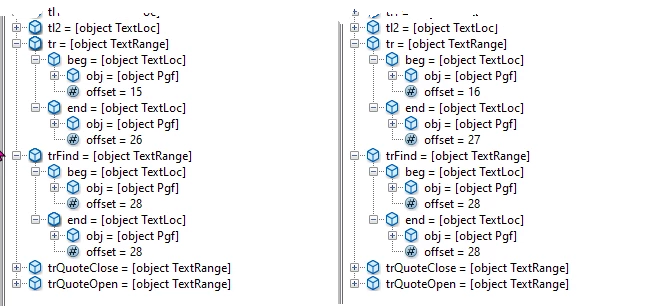
→ Although trFind points to the location after the closing quote, the object is found at the old location.

I have explicitly set up an independent object trFind, as I know that o2 = o1 makes not a copy of object o1, but an 'alias'. What's going wrong here?

The second problem i see is this

  • The closing quote is inserted and formatted correctly (black)
  • The opening quote is inserted, but not formatted correctly (red)

While inspecting this situation with the cursor and looking into the status line i discover this (the yellow higlight is just an idication):

  • Moving the cursor from left to right via "ht " to the opening quote and selecting it reports no character format.
  • Moving the cursor from right to left via "mmiZ" to the opening quote and selecting it reports f "window". But this obviously overrun by colour red - not indicated by a *

Side note

The green wiggles after t he closing German quote are the result of an old bug, which was claimed to be fixed.

This topic has been closed for replies.
Correct answer K.Daube

Towards a solution of the main problem

After much tinkering I have now a solution for all cases

  1. only one item in the whole text frame
  2. item at the beginning or end of the paragraph
  3. multiple items in the paragraph

A persky problem was to find a termination condition for the while loop. I had a number of conditions for the cases 2 and 3, but case 1 caused a loop. So I ended up with a brute force condition to stop the while loop: if a terminating quote already exists, we are done.

There is not much use of the Do-not-Wrap setting in the Find parameters. This works only for searching within a text range - not when the search is 'restarted' in a loop. See Markus Wiedenmaier 2012.

The now working script and test document are here: Enclose-with-quotes.zip


5 replies

K.Daube
Community Expert
K.DaubeCommunity ExpertAuthorCorrect answer
Community Expert
November 8, 2021

Towards a solution of the main problem

After much tinkering I have now a solution for all cases

  1. only one item in the whole text frame
  2. item at the beginning or end of the paragraph
  3. multiple items in the paragraph

A persky problem was to find a termination condition for the while loop. I had a number of conditions for the cases 2 and 3, but case 1 caused a loop. So I ended up with a brute force condition to stop the while loop: if a terminating quote already exists, we are done.

There is not much use of the Do-not-Wrap setting in the Find parameters. This works only for searching within a text range - not when the search is 'restarted' in a loop. See Markus Wiedenmaier 2012.

The now working script and test document are here: Enclose-with-quotes.zip


K.Daube
Community Expert
K.DaubeCommunity ExpertAuthor
Community Expert
November 5, 2021

Towards a solution of the mainproblem

I have now changed the order of insertion: first the opening, then the closing quote.

  while(FA_errno === Constants.FE_Success) { // && nLoopCnt++ < 2*loopMax
    oDoc.TextSelection = oTR;
    oPfg = oTR.beg.obj;
    lFound = oTR.end.offset- oTR.beg.offset
//  insert the opening quote at the beginning of the text range and apply character tag
    oDoc.AddText(oTR.beg, sQuoteOpen);
    oTL1 = new TextLoc(oTR.beg.obj, oTR.beg.offset);
    oTL2 = new TextLoc(oTR.beg.obj, oTR.beg.offset + sQuoteOpen.length);
    oTRQuoteOpen = new TextRange (oTL1, oTL2);
  	ApplyCharFmt (oTRQuoteOpen, sCharFmtQuote, oDoc);
//  insert the closing quote at the end of the text range and apply character tag
    oTL1 = new TextLoc(oTR.beg.obj, oTL2.offset + lFound);;
    oTL2 = new TextLoc(oTR.beg.obj, oTL2.offset + lFound + sQuoteClose.length);
    oDoc.AddText(oTL1, sQuoteClose);
    oTRQuoteClose = new TextRange (oTL1, oTL2);
    ApplyCharFmt (oTRQuoteClose, sCharFmtQuote, oDoc);

    oTRnext = new TextRange();         // advance behind the quoted string & find again
    oTRnext.end.obj    = oTRnext.beg.obj = oPfg;
    oTRnext.beg.offset = oTR.end.offset + sQuoteOpen.length + sQuoteClose.length;
    oTRnext.end.offset = oTRnext.beg.offset;
$.bp(true);
    oTR = oDoc.Find (oTR.beg, oFindParams);   // oTRnext is not honoured!
$.bp(true);
  }

This works correctly as long as the found string is not terminated by the ¶ mark. For this effect I need to dig deeper.

K.Daube
Community Expert
K.DaubeCommunity ExpertAuthor
Community Expert
November 5, 2021

The main probem - various findings

  1. Even if I set the position to start the next find explicitly outside the first range, I get the same bad result:
    trFind.end.offset = trFind.beg.offset = 35;​
  2. This is t he result, if maxLoop is set to 2 (4 iterations):
  3. The search advances correctly, if nothing is inserted. Hence I must check the insertion process more carefully.


K.Daube
Community Expert
K.DaubeCommunity ExpertAuthor
Community Expert
November 4, 2021

Solution to the second problem

The second problem was caused  by an incomplete character format quote (colour = AsIs).

The closing quote appers in black, because that's the colour of the following characters in the string. See this discussion.

For the same reason the opening quote gets colour red from the following characters...

Community Expert
November 4, 2021

Actually this is my problem, and as I had used Klaus' script library as a resource, I had asked Klaus for help.

I have only little experience with ExtendScript and would not be able to check all variables and properties.

Klaus and all others, thank you very much for your help and engagement!