
Inspiring
February 16, 2020
Answered

Fresco distorts, mangles, changes saved files when opening after saving

  • February 16, 2020
  • 2 replies
  • 1824 views

I have had this problem repeatedly. I work on a drawing. Close it. Then when I open it again the next morning several layers are distorted, changed missing. Elements of the drawing have been moved or distorted. And the names of the layers have been changed. I always lock ALL layers when closing/saving a file. 
 
I will have to stop using Fresco if this keeps happening.
 
This seems to me to be a major problem. Saving a file is one of the most basic things in any application. If a file changes randomly after being saved in an application I would not even qualify that application in beta, much less for release. 
 
I also own the Creative suite with Photoshop, Illustrator etc. but on the iPad Fresco is what I would prefer to use. 
 
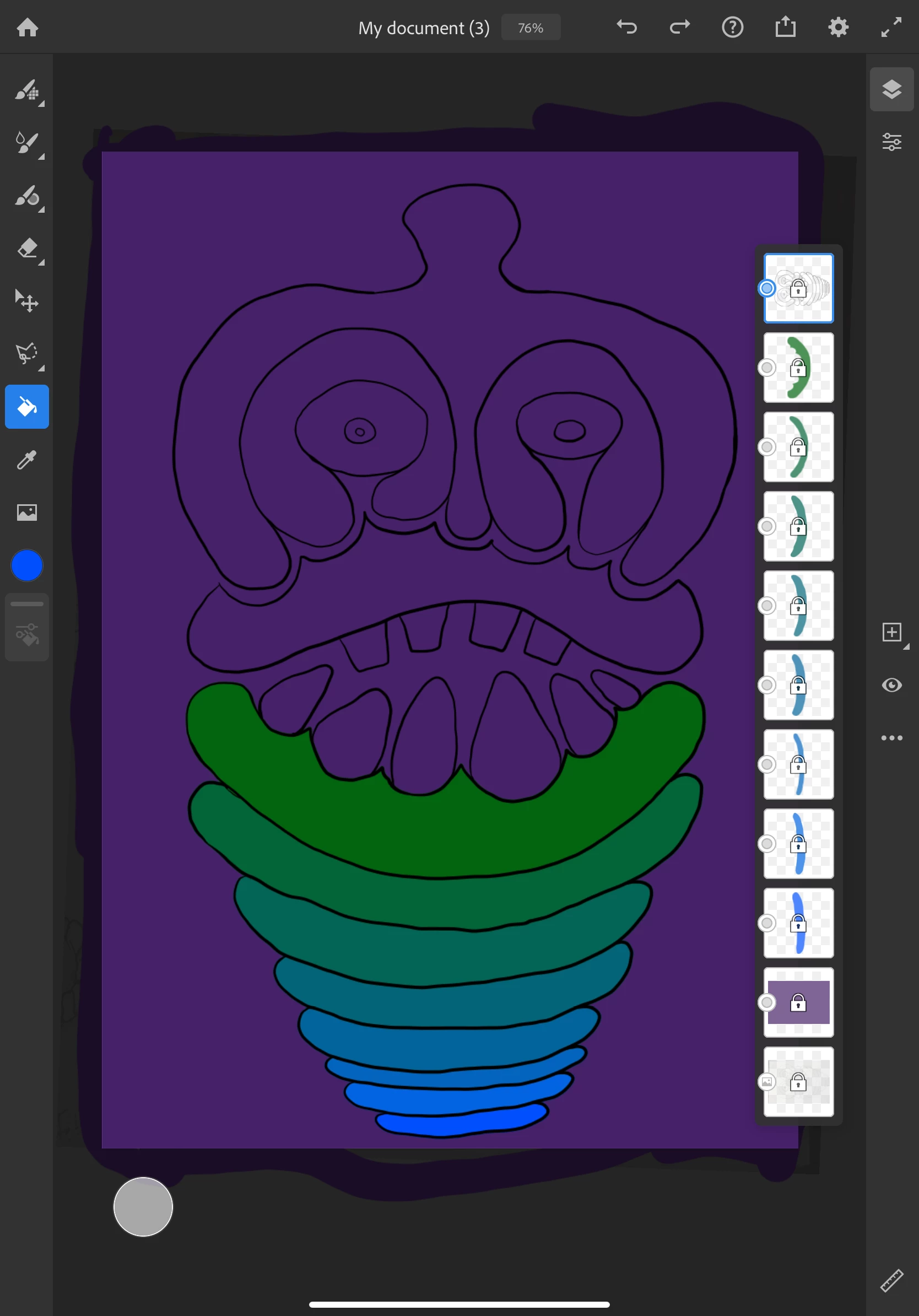
I am sending screen shots of before (the file when I have finished working on it) and after (the file when I open it again and the file is distorted.)
 
BEFORE


AFTER
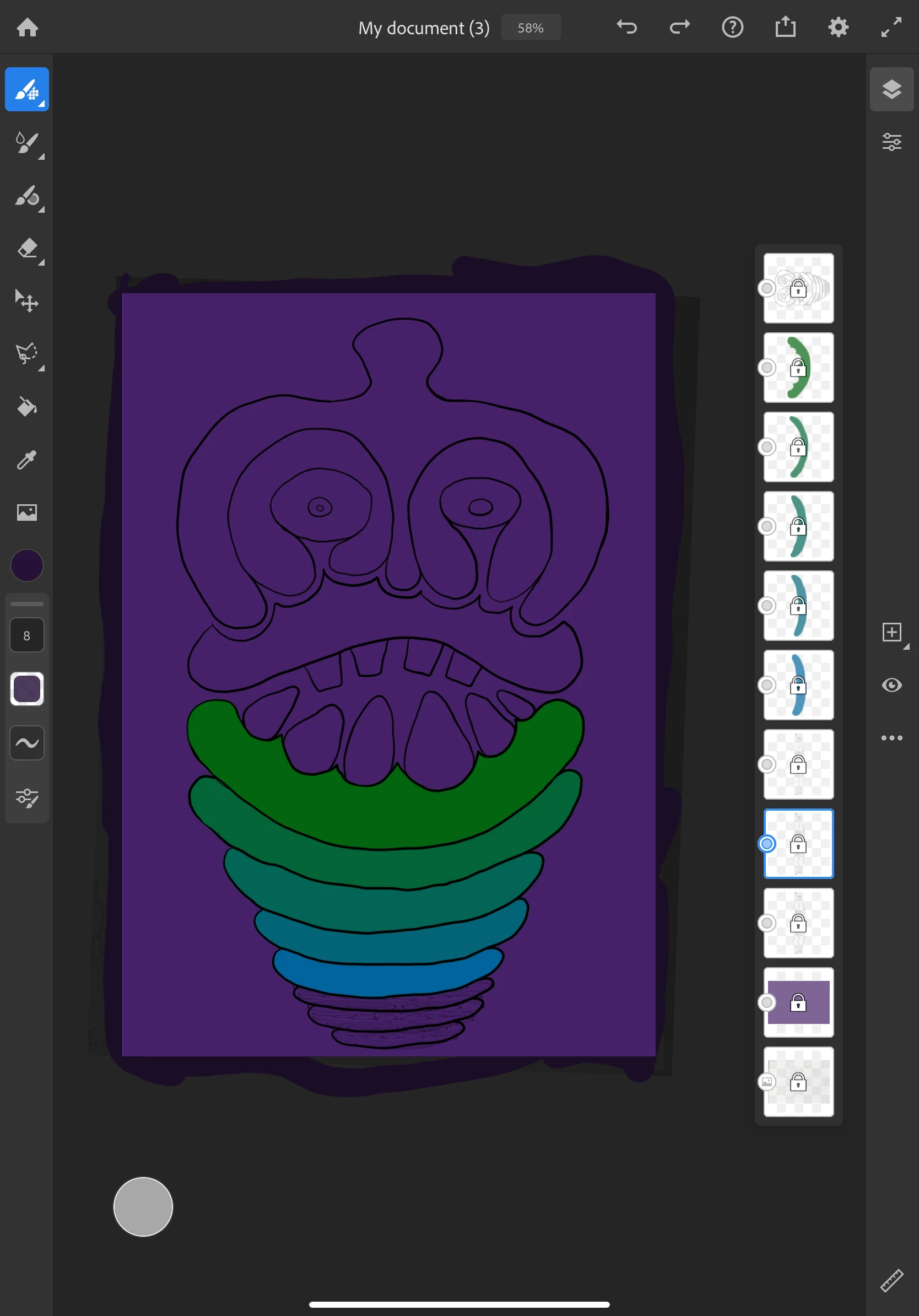


I have also noticed 2 other notes on your support site regarding this problem that have not been solved.
 
https://community.adobe.com/t5/fresco/adobe-fresco-won-t-save-my-progress/m-p/10901656?page=1#M1506
App Version: 1.3.1.291 (64-bit)
OS Version: 13.3.1
Device Model: iPad Pro 3 (11") (iPad8,2)
User Memory: 768 MB
Total Memory: 5694 MB
Free Disk Space: 921757 MB
Total Disk Space: 976562 MB
*


This topic has been closed for replies.
Correct answer danielwiener

Srishti,

Thanks. I think the issue has been solved. I also sent a bug report through the app.


This is their response. I am posting it in case it will help other people.


This is a bug that I believed to be fixed in the new build (v1.3). It was the result of opening/editing a document that contains previously-locked layers.

Since I can see that you've updated the app, I have a couple of questions:
Does this drawing have locked layers?
Are you drawing with vector brushes?
Is this older documents, created prior to the update, that you're noticing this? If it is, or you're unsure, please try creating a new document and following these steps:
1. Create a vector layer. Draw a circle and lock the layer
2. Close and reopen.
3. Unlock the layer, draw a stroke on the right side of the canvas.
4. Relock layer.
5. Close and reopen
6. Is the circle distorted?

Please let me know if the drawing is still distorting so I can let the team know that the bug is not fixed.

====

MY RESPONSE:

I have done what you asked and the circle is not distorted. I have been working on drawings since I wrote you and the issue has not occurred again, though I have been exporting various formats as I go along out of paranoia that I will lose what I have done. (This reminds me of using Apple computers in the 90s which crashed all the time). But it looks like the bug is fixed. Thanks.

2 replies

Participant
December 7, 2021

In the past 2 days Fresco has cropped 2 images that I closed and then tried to reopen. Have lost hours of work. I don't think this has been fixed. 


I'm on iPad Pro 5th gen - 15.0.2


Participating Frequently
January 12, 2022

Hello,


Fresco crashes constantly on my Windows 10 laptop. I have submitted many, many crash reports and haven't gotten a response. I think the app is corrupting files.


If I can get to the Fresco home page without crashing, it might still crash when loading a file. Sometimes I can work on a painting and save it, but it might crash when re-opening the file. 

It seems to happen more with any document that had a .jpg imported. But it also happens with some that don't have the images.

If I open a file in PhotoShop that was created in Fresco sometimes layers are missing.


I really want Fresco to work for me because the Live Oil brushes can't be matched in any other app. 


As an aside, Concepts doesn't seem to like my Intel Iris Xe GPU so it has the flickering/layer hiding issue. I don't think the Intel driver is the issue with Freso.


Maybe someone from Adobe will start responding .... ?

Srishti_Bali
Legend
February 17, 2020

Hi Daniel,


So sorry to hear about these issues. Is the issue related to a specific document? If yes, could you please share the document with us? 


This will help us replicating this issue at our end and help accordingly. 


Regards,

Srishti

danielwienerAuthorCorrect answer
Inspiring
February 18, 2020

Srishti,

Thanks. I think the issue has been solved. I also sent a bug report through the app.


This is their response. I am posting it in case it will help other people.


This is a bug that I believed to be fixed in the new build (v1.3). It was the result of opening/editing a document that contains previously-locked layers.

Since I can see that you've updated the app, I have a couple of questions:
Does this drawing have locked layers?
Are you drawing with vector brushes?
Is this older documents, created prior to the update, that you're noticing this? If it is, or you're unsure, please try creating a new document and following these steps:
1. Create a vector layer. Draw a circle and lock the layer
2. Close and reopen.
3. Unlock the layer, draw a stroke on the right side of the canvas.
4. Relock layer.
5. Close and reopen
6. Is the circle distorted?

Please let me know if the drawing is still distorting so I can let the team know that the bug is not fixed.

====

MY RESPONSE:

I have done what you asked and the circle is not distorted. I have been working on drawings since I wrote you and the issue has not occurred again, though I have been exporting various formats as I go along out of paranoia that I will lose what I have done. (This reminds me of using Apple computers in the 90s which crashed all the time). But it looks like the bug is fixed. Thanks.