
Participant
June 8, 2023
Question

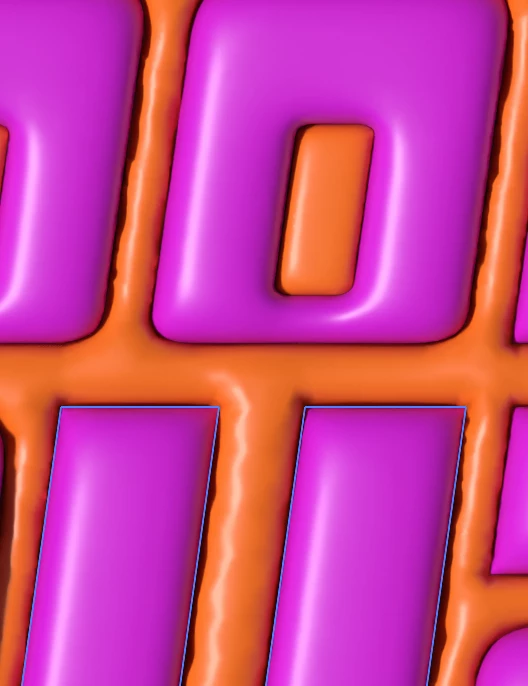
3D Inflate is making my lines/shadows wavy when they are straight lines?

  • June 8, 2023
  • 1 reply
  • 881 views

Hi there,


I am using 3D and Materials - Inflate on a text vector that has a shape behind it (it is grouped). However the shadows/lines are coming up weird and wavy when they are meant to be straight like the vector. 


Does anyone know how to fix this/why it is happening?


Thanks

!
This topic has been closed for replies.

1 reply

Anubhav M
Community Manager
Community Manager
June 9, 2023

Hello @CalumM16,


We understand that encountering technical issues can be frustrating. Would you mind pressing the Cmd+E (macOS) or the Ctrl+E (Windows) keys to check if it helps?

If the problem persists, kindly share more details, like the exact version of the OS/Illustrator, system config (CPU/GPU/Memory), a sample file (https://community.adobe.com/t5/illustrator-discussions/share-your-files-in-6-simple-steps/td-p/12967531), and a screen recording of the problem (https://community.adobe.com/t5/illustrator-discussions/screen-record-an-issue-on-windows-amp-macos-for-sharing/td-p/12967727), so we can investigate this further.


Looking forward to hearing from you.


Thanks,

Anubhav


CalumM16Author
Participant
June 12, 2023

Hi Anubhav,


Thank you for responding and your help. Unfortunately Cmd+E does not fix it.


I am using OS Ventura and Illustrator 2023 on a MacBook Pro 2022 with 8GB memory.

The file is here and I have also attached a screen recording.


Thank you once again for your help.
Calum


CalumM16Author
Participant
June 14, 2023