mathildefghij
Participant
February 26, 2023
Answered

3D rendering issue

  • February 26, 2023
  • 1 reply
  • 1348 views

hey everyone,


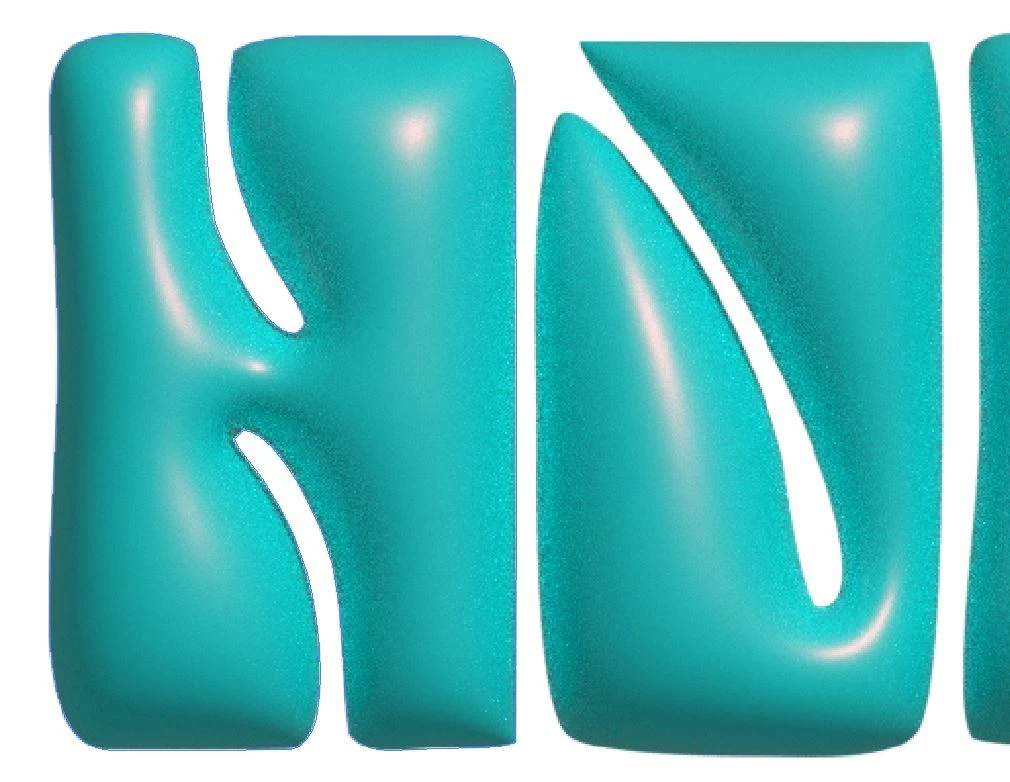
I know this topics has a lot of posts about it but I can't find the answer to my problem. All my 3D objects have an excessive amount of noise. My Nvidia graphic card is up to date (517.48), I tried every settings on the 3D panel (such as "reduce noise", etc) but nothing seem to work. I opened some old 3D artworks I made on Illustrator in may 2022 and they all look good, but every new 3D object have that issue. Any idea on where that issue could come from ? thanks !!
 

This topic has been closed for replies.
Correct answer mathildefghij

Update for those who might be interested : turns out Illustrator can't find my GPU and only displays my artwork with the CPU - this explains why my 3D render is so grainy. I still don't know how to fix that since I updated everything on my computer, so I might just reset my laptot.

1 reply

Monika Gause
Community Expert
Community Expert
February 26, 2023
mathildefghij
Participant
February 26, 2023

thank you Monica, I saw this discussion and this is why I updated my Nvidia driver - everything on my laptot is up to date (windows, drivers, illustrator). I've always had that driver and the 3D used to work perfectly. I don't know what has changed since...

Monika Gause
Community Expert
Community Expert
February 26, 2023

Did you update to the latest Illustrator version 27.3?

That version has a couple issues - so far I haven't seen 3D issues reported, but maybe you are the first person to see them?