Participant
February 24, 2017
Answered

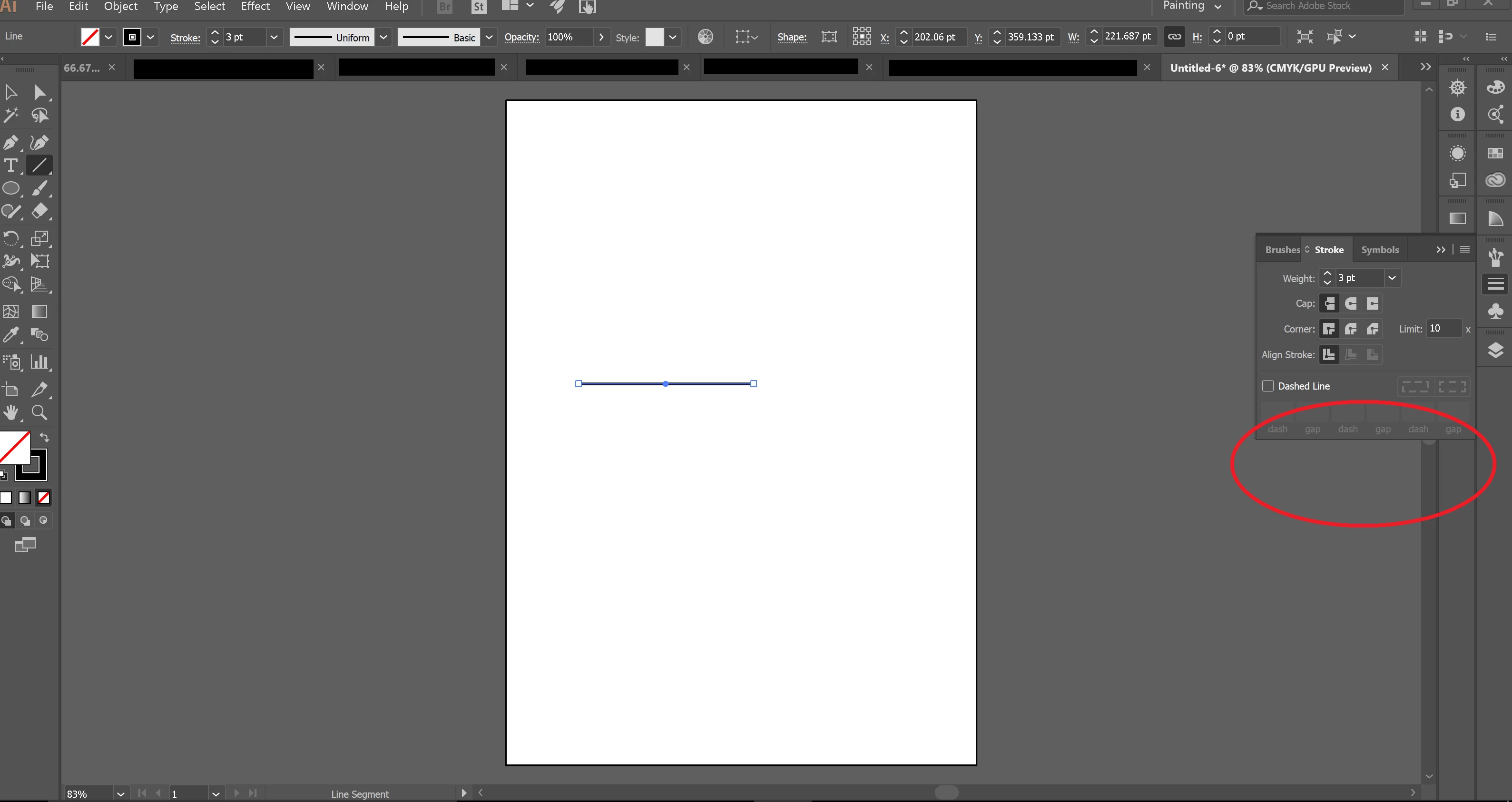
"Add arrowheads" missing

  • February 24, 2017
  • 5 replies
  • 51830 views

Hi all,

I would like to add arrowheads to a stroke in Illustrator. However, the section "add arrowheads" is missing in the stroke panel. Where did it go? Thanks for your help.

Florian
    Correct answer Monika Gause

    Double click the panel's title bar (or its tab).

    5 replies

    TwistyBitz
    Participant
    June 3, 2020

    Participant
    November 22, 2019

    No one of the options has worked for me, I just can't seem to find the arrow library anywhere...

    I'm on CC 2019 ID v14.0.3

    Any guidance appreciated

    Doug A Roberts
    Community Expert
    Community Expert
    November 22, 2019

    InDesign 2019? This topic is about Illustrator.

    Participating Frequently
    May 28, 2020

    Yeah none of those worked for me. Am on CS3. Any guidance much appreciated. 

    Jamie_Starr
    Participant
    August 17, 2018

    It's real easy, but does not excuse them needlessly changing it:
    In the Appearance tab (Window > Appearance), click on the word/hyperlink "Stroke."
    That's all.

    Doug A Roberts
    Community Expert
    Community Expert
    August 17, 2018

    What has changed?

    Participant
    June 15, 2018

    It doesn't work the same way it has for a dozen+ years in Illustrator CC 2018.

    Adobe - WTF did you do???

    Monika Gause
    Community Expert
    Community Expert
    June 15, 2018

    thinkcooper!  schrieb

    It doesn't work the same way it has for a dozen+ years in Illustrator CC 2018.

    Can you please tell us step by step what exactly is not working for you?

    Participant
    June 15, 2018

    User error...

    Monika Gause
    Community Expert
    Monika GauseCommunity ExpertCorrect answer
    Community Expert
    February 24, 2017

    Double click the panel's title bar (or its tab).

    Participant
    February 24, 2017

    Thank you... works!
