Participant
September 26, 2017
Answered

Adding symbols to CC Libraries removes symbol direct selection tool editing capabilites.

  • September 26, 2017
  • 2 replies
  • 1434 views

I have a question.

If I create a symbol in an Illustrator file, and then place an instance of that symbol on the artboard, I can change some of the symbol's element's properties (background color etc.) using the direct selection tool.

If I create an assets of this symbol in Libraries and place that asset on the artboard, I can't seem to get the same result as mentioned above, using the direct selection tool).

Has anyone come accross this issue. I'm looking for a way to get this right.

🙂
    This topic has been closed for replies.
    Correct answer Mike_Gondek10189183

    The reason you are able to change some attributes of the symbol is because you choose dynamic when creating.

    Design more efficiently with Dynamic Symbols |

    You missed  a few important details in your description, but lets see how good my psychic abilities are.

    • you did this in CC2017 not 2015
    • you dragged the element from your library panel to you artboard.

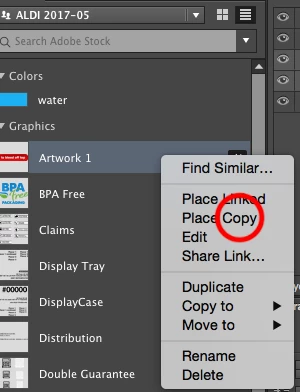
    Try option dragging or right click on library item and choose place copy.

    2 replies

    Mike_Gondek10189183
    Community Expert
    Mike_Gondek10189183Community ExpertCorrect answer
    Community Expert
    September 26, 2017

    The reason you are able to change some attributes of the symbol is because you choose dynamic when creating.

    Design more efficiently with Dynamic Symbols |

    You missed  a few important details in your description, but lets see how good my psychic abilities are.

    • you did this in CC2017 not 2015
    • you dragged the element from your library panel to you artboard.

    Try option dragging or right click on library item and choose place copy.

    XineohAuthor
    Participant
    September 27, 2017

    Your psychic abilities are spot on!

    Placing a copy works! Thanks.

    This creates a new dilemma though. I'm trying to achieve the following:

    Given I have two or more documents open, each containing the same symbol, placed as copy from Libraries,

    When I edit the original symbol in Libraries, and save it,

    Then Symbol is not updated on all documents, since it's placed as a copy.

    Is it possible to have a Symbol placed from Libraries in multiple docs (that is updateable by editing the original) while still maintaining symbol (direct selection editing) dymanic functionality.

    The following use case is what I want to achieve:

    • I have designed a navigation bar for a website.
    • Each page of the website (About Us and Contact Us) is a separate Illustrator document containing the same dynamic symbol placed from Libraries.
    • I used the direct selection tool, to change the color of the icon of each state.
    • Now I need to add a new additional third icon to the navigation bar.
    • I do this by editing the original symbol from Libraries.
    • Now I would expect that the new edited symbol would update on all documents, and would still be individually editable (on each document) by means of the direct selection.

    Is this be possible? MikeGondek

    Mike_Gondek10189183
    Community Expert
    Community Expert
    September 28, 2017

    What you ask for i believe is not possible.

    In order to be able to edit the symbol, that is made in to library item, you must place that as a copy rather than linked. Once you place as copy you break the link to the library. You could place as linked from the library, but then you cannot edit.

    Myra Ferguson
    Community Expert
    Community Expert
    September 26, 2017

    Artwork that you add to Libraries is stored in the Creative Cloud so that you can access it in other applications that support CC Libraries. If you want to edit that artwork in Illustrator, go up to the control panel and select Edit Original. Any changes will be made to that artwork in the library. If you don't want to edit that original, then you can also go up to the control panel to embed the art into your Illustrator file and make changes that affect only it.