Inspiring
February 18, 2026
Answered

"Adobe Illustrator 2026.app" would like to access data from other apps."

  • February 18, 2026
  • 16 replies
  • 5043 views

After the last update of the application, the following pop-up appears every time after launching:
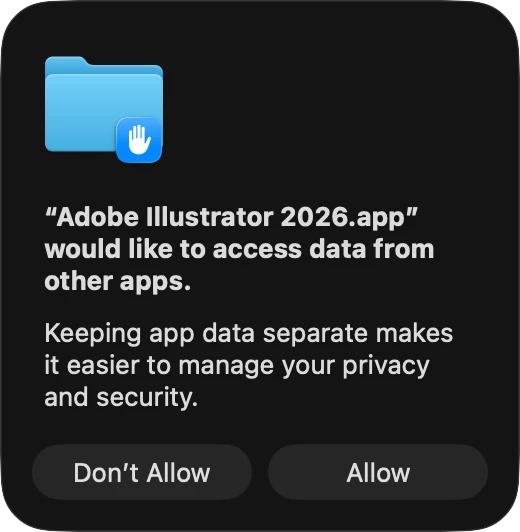


How can I stop it?

Thanks in advance.

Correct answer Harshika Verma

Hi ​@Robbe32229705vq9e,

Thank you for reaching out. We completely understand how frustrating this situation can be, and we appreciate your patience.
 

As Anubhav mentioned earlier, this is a known issue, and our team is actively working on a resolution. In the meantime, you may try a workaround by granting Full Disk Access through your macOS settings, as this has helped stop the prompt for some users.
 

Additionally, since Illustrator is not showing in the list, could you please let us know what happens when you click the “+” icon at the bottom and try to manually add Illustrator?
 

If the issue persists, we recommend using the Cleaner Tool to perform a fresh uninstall and reinstall of Adobe Illustrator.
 

Please let us know how it goes or if you need any further assistance. We’re here to help

Thanks,

Harshika
<Marking this as correct to highlight at the top for new users>

16 replies

Participant
June 1, 2026

@Harshika Verma, “you may try a workaround by granting Full Disk Access through your macOS settings” is not an acceptable workaround and should not be the correct answer. I don’t want Illustrator having access to other apps. This is poor security management and a poor workaround solution for users. Especially if users don’t understand why that’s a workaround. None of my apps have full disk access and they have never needed full disk access to function. Illustrator should be no different.

For users reading this, you do not need to give an app Full Disk Access unless that app really needs access to all (or most) of your data on your computer. So, do not grant an app Full Disk Access unless it truly needs broad access to your data. In most cases, only disk utility tools that manage or erase system data require this access.

What I’m experiencing with this issue: I clicked “Allow” and checked for Illustrator’s app permissions in my system settings. I don’t see Illustrator under Privacy & Security > Full Disk Access and I don’t see it anywhere else under the Privacy & Security settings, so this issue seems more like an annoying bug that doesn’t actually do anything accept keep asking you to Allow/Deny access to other apps. Looks like ​@Miraud has seen the same thing, so I agree with this being a bug. A really annoying one and I hope the intent around this issue is to collect data from Adobe apps only, not other apps.

TiffLarsen
Participant
May 29, 2026

The only fix is to allow full disk access?? No. The point is I’m trying NOT to allow any access. Do better, Adobe.

npad
Participant
June 1, 2026

Yeah I ain’t doing that. The fact this bug is “3 months old” is extremely sus. 

Participant
May 19, 2026

THIS SOUNDS COMPLETELY SUSPICIOUS!!! IM CONTACTING AN IT EXPERT TO SEE IF ADOBE IS COLLECTING INFORMATION!

npad
Participant
June 1, 2026

it is so SUS. I have to allow 10 different network connections to use illustrator and now it wants FULL disk access?!? tf 

Juan Cano
Inspiring
May 14, 2026

Fix it darn it!!!!! If photoshop and InDesign don’t ask this, why is Illustrator doing it? Please prioritize this fix it’s been like a month!


mattaihs
Participant
May 14, 2026

Totally downloading Affinity right now. I’ve been an Adobe user for over 20 years, but this is just the last straw. How can this not be a simple fix? And NO, I’m not giving ANY app full disk access. Ridiculous suggestion!

nopeynope
Participant
May 7, 2026

It would be really cool if people would stop suggesting that giving in and allowing Adobe to have full disk access is an acceptable “workaround.”
 

Yes, it will stop the messages from popping up. Yes, it’s annoying that apparently there are extra steps to do this for Illustrator. But the bigger problem is that Adobe seems to be attempting to force, coerce and trick users into allowing full disk access, every single time any Adobe program is opened. For what? Why should I risk my security so that Adobe programs can talk to each other, or whatever other nonsense this is even about? Aside from the infuriating pop-ups, all of my apps have always worked perfectly fine without full disk access. My computer says no, and so do I.

Participant
May 5, 2026

I am experiencing the same on a brand new Mac Studio M4 Max with 36 GB Ram.
I tried restarting Illustrator with a preferences reset, uninstalling and re-installing it through Creative Cloud. Nothing seems to help…

Don’t know if it’s related but about 75% of the times when quitting Illustrator I also get the loading beachball of MacOS.

When going to Security & Privacy in my Mac’s Settings other Adobe applications have ‘Full Disk Access’ and ‘Files and Folders’ allowed. But Illustrator is not showing in the list.

Harshika Verma
Community Manager
Harshika VermaCommunity ManagerCorrect answer
Community Manager
May 7, 2026

Hi ​@Robbe32229705vq9e,

Thank you for reaching out. We completely understand how frustrating this situation can be, and we appreciate your patience.
 

As Anubhav mentioned earlier, this is a known issue, and our team is actively working on a resolution. In the meantime, you may try a workaround by granting Full Disk Access through your macOS settings, as this has helped stop the prompt for some users.
 

Additionally, since Illustrator is not showing in the list, could you please let us know what happens when you click the “+” icon at the bottom and try to manually add Illustrator?
 

If the issue persists, we recommend using the Cleaner Tool to perform a fresh uninstall and reinstall of Adobe Illustrator.
 

Please let us know how it goes or if you need any further assistance. We’re here to help

Thanks,

Harshika
<Marking this as correct to highlight at the top for new users>

theryzor
Inspiring
May 7, 2026

The continued inclination to offer unnecessary privacy invasion as a workaround to this issue is making Affinity sound pretty good.

Mahmut Ucar
Participant
April 14, 2026

⚠️ Important Notice


This is a critical procedure. During these steps, all Adobe-related data on your system will be removed, including application settings, preferences, cache files, and logs. These files will be permanently deleted.

I personally resolved this issue using the steps below.

-
Operating System: macOS Tahoe 26.3 (25D125)

  1. Remove Adobe Illustrator via Terminal:
    sudo rm -rf "/Applications/Adobe Illustrator 2026
  1. Clean residual files via Terminal:
    rm -rf ~/Library/Application\ Support/Adobe/*
    rm -rf ~/Library/Preferences/com.adobe.*
    rm -rf ~/Library/Caches/com.adobe.*
    rm -rf ~/Library/Logs/Adobe/*
  1. If you are the only user on the system, grant yourself admin privileges via Terminal: sudo dseditgroup -o edit -a $(whoami) -t user admin
  1. Perform a clean installation of Adobe Illustrator using Adobe Creative Cloud.
  1. ***After installation, go to Settings + Privacy & Security. Scroll down to “Full Disk Access” (this step is critical). Click the (+) button and select “Adobe Illustrator.app” from the Applications folder.
  1. Restart your computer. The issue should be resolved.
mahmutucart
Participant
May 12, 2026


Mahmut Ucar
Participant
April 14, 2026

This is a problematic situation.

mahmutucart
Participating Frequently
May 3, 2026

indeed

Anubhav M
Community Manager
Community Manager
April 14, 2026

Hello everyone,
 

Our team is currently investigating the issue. We will keep you posted as we have more updates.
Please don’t hesitate to reach out if you have more questions or need assistance. We'd be happy to help.
 
Anubhav

nopeynope
Participant
April 30, 2026

While we’re waiting, would you please tell us how to revoke access when we accidentally click allow because this window pops up every single time we open any adobe app? Thanks.

Anubhav M
Community Manager
Community Manager
May 1, 2026

Hello ​@nopeynope 


The permission for Full Disk Access can be revoked at any time from the System Preferences (https://helpx.adobe.com/lightroom-classic/help/video/allow-permissions-video.html).


Please don't hesitate to reach out if you have more questions or need assistance. We'd be happy to help.

Anubhav